Forum Discussion

Help creating a matrix table
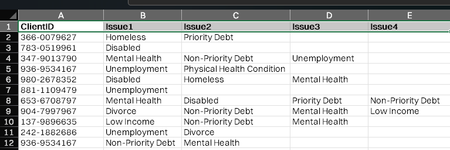

Thanks so much SergeiBaklan.
Being able to have it as a Power Query expression is definitely helpful for Power BI purposes. I was able to adapt your expression to also create reverse pairs (i.e also having the output as item2 -> item1) as my aim is to have an omni-directional chord chart in Power BI so that provides equal weight to the issue catagories (included code below as I am a newbie and may not have gone about it in the best way!)
let
    // Load data from Excel table
    Source = Excel.CurrentWorkbook(){[Name="Issues"]}[Content],

    // Convert row values (excluding ID) into a cleaned list
    AddListColumn = Table.AddColumn(Source, "ValuesList", each
        List.Sort( List.RemoveNulls(List.Skip(Record.FieldValues(_), 1)) )
    ),

    // Generate all 2-value combinations (handling 1- and 2-value cases correctly)
    AddCombinations = Table.AddColumn(AddListColumn, "Pairs", each
        List.Combine(
            if List.Count([ValuesList]) = 1 then  { { { [ValuesList]{0}, ""}  } }
            else if List.Count([ValuesList]) = 2 then { { [ValuesList] } }
            else List.Transform(
                List.RemoveLastN([ValuesList], 1),
                (x) => List.Transform(
                    List.Select([ValuesList], (y) => y > x),
                    (y) => {x, y}
                )
            )
        )
    ),

 // Generate reverse pairs
    AddReversePairs = Table.AddColumn(AddCombinations, "ReversePairs", each
        List.Transform([Pairs], (pair) => {pair{1}, pair{0}})
    ),

    // Combine original pairs and reverse pairs
    CombinePairs = Table.AddColumn(AddReversePairs, "AllPairs", each
        List.Combine({[Pairs], [ReversePairs]})
    ),

    ExpandPairs = Table.ExpandListColumn(CombinePairs, "AllPairs"),
    ExtractColumns = Table.TransformColumns(ExpandPairs, {"AllPairs", each Record.FromList(_, {"Item1", "Item2"})}),
    ExpandFinal = Table.ExpandRecordColumn(ExtractColumns, "AllPairs", {"Item1", "Item2"}),

    FinalTable = Table.SelectColumns(RemoveDuplicates, {"ClientId", "Item1", "Item2"})

in
    FinalTable
However, as I am visualising the data in a chord chart, it presents an issue if there is no matching pair in the item2 cell (so where item1 has data but item2 is blank)
Is there a way to fill a blank cell with the data from its adjacent cell (for instance, where item1 = "Priority Debt" and item2 is blank, could the query also fill the item2 with the data from item1. This will allow the chord chart to know to point back to the same issue rather than directing it to a null value? (Hope that makes sense).
Example below is that helps, as I feel I may not have explained it very effectively!
Thanks again for all your help!

Antman75 , I didn't test, but if you change
if List.Count([ValuesList]) = 1 then { { { [ValuesList]{0}, ""} } }on
if List.Count([ValuesList]) = 1 then { { { [ValuesList]{0}, [ValuesList]{0}} } }it shall work.