Forum Discussion

Help creating a matrix table

Thanks to you and SergeiBaklan
I did post a reply earlier but it seems to have vanished, so apologies if this now appears twice! The macro you provided works perfectly to create the adjacent pairs, so thank you for that.
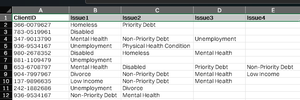
The formula to sum the number of occurrences seems to work fine, apart from where there is only one category listed. To provide an example from your sheet: Wednesday occurs as a lone entry in cell B3 and B19. Therefore one would assume that it should have a sum of '2' in cell I8. However, it shows a value of 7. Using your kindly provided example sheet, the same is true when expanding the formula to cell I31 (for the Friday entry). The miscalculation also shows up in my range when using the formula. It must be summing the combination of blank spaces I think?
Thanks again for your help!

You are welcome. Yes, you are right. The previously suggested formula returns the number of rows from column B-E where Wednesday and a blank (as in range G8:H8) cell occur.
=IF(H2="",
     COUNTIFS($B$2:$B$25,G2,$C$2:$C$25,"",$D$2:$D$25,"",$E$2:$E$25,""),
    SUM(
    (MMULT(--($B$2:$E$25=G2), TRANSPOSE(--(COLUMN($A$1:$D$1)>0)))>0 )*
    (MMULT(--($B$2:$E$25=H2), TRANSPOSE(--(COLUMN($A$1:$D$1)>0)))>0 )
))
If you want to return the count of 2 in that situation you can use the above formula.