Forum Discussion

Help creating a matrix table
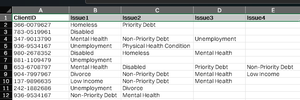

Sub matrixtable()

Dim i As Long, j As Long, k As Long
Range("F:H").Clear

k = 2
For i = 2 To Range("B" & Rows.Count).End(xlUp).Row
j = Application.WorksheetFunction.CountA(Range(Cells(i, 2), Cells(i, 5)))
Select Case j

Case Is = 1
Cells(k, 7).Value = Cells(i, 2).Value
Cells(k, 6).Value = Cells(i, 1).Value
k = k + 1
Case Is = 2
Cells(k, 7).Value = Cells(i, 2).Value
Cells(k, 8).Value = Cells(i, 3).Value
Cells(k, 6).Value = Cells(i, 1).Value
k = k + 1
Case Is = 3
Cells(k, 7).Value = Cells(i, 2).Value
Cells(k, 8).Value = Cells(i, 3).Value
Cells(k + 1, 7).Value = Cells(i, 2).Value
Cells(k + 1, 8).Value = Cells(i, 4).Value
Cells(k + 2, 7).Value = Cells(i, 3).Value
Cells(k + 2, 8).Value = Cells(i, 4).Value
Cells(k, 6).Value = Cells(i, 1).Value
Cells(k + 1, 6).Value = Cells(i, 1).Value
Cells(k + 2, 6).Value = Cells(i, 1).Value
k = k + 3

Case Is = 4
Cells(k, 7).Value = Cells(i, 2).Value
Cells(k, 8).Value = Cells(i, 3).Value
Cells(k + 1, 7).Value = Cells(i, 2).Value
Cells(k + 1, 8).Value = Cells(i, 4).Value
Cells(k + 2, 7).Value = Cells(i, 2).Value
Cells(k + 2, 8).Value = Cells(i, 5).Value
Cells(k + 3, 7).Value = Cells(i, 3).Value
Cells(k + 3, 8).Value = Cells(i, 4).Value
Cells(k + 4, 7).Value = Cells(i, 3).Value
Cells(k + 4, 8).Value = Cells(i, 5).Value
Cells(k + 5, 7).Value = Cells(i, 4).Value
Cells(k + 5, 8).Value = Cells(i, 5).Value
Range(Cells(k, 6), Cells(k + 5, 6)).Value = Cells(i, 1).Value

k = k + 6

End Select


Next i

End Sub
This code returns the intended output in column F:H in my sheet. For ~1500 rows in cols A-E the code runtime was ~3 seconds in my sheet. If necessary the code can be changed and executed in the main memory which would speed up the runtime significantly. The attached sample file doesn't contain the macro because for some reason i can't attach a macro-enabled Excel file anymore.
=SUM(
    (MMULT(--($B$2:$E$25=G3), TRANSPOSE(--(COLUMN($A$1:$D$1)>0)))>0 )*
    (MMULT(--($B$2:$E$25=H3), TRANSPOSE(--(COLUMN($A$1:$D$1)>0)))>0 )
)
This formula was contributed by SergeiBaklan in an earlier discussion and i adapted it for your task.

Thanks to you and SergeiBaklan
I did post a reply earlier but it seems to have vanished, so apologies if this now appears twice! The macro you provided works perfectly to create the adjacent pairs, so thank you for that.
The formula to sum the number of occurrences seems to work fine, apart from where there is only one category listed. To provide an example from your sheet: Wednesday occurs as a lone entry in cell B3 and B19. Therefore one would assume that it should have a sum of '2' in cell I8. However, it shows a value of 7. Using your kindly provided example sheet, the same is true when expanding the formula to cell I31 (for the Friday entry). The miscalculation also shows up in my range when using the formula. It must be summing the combination of blank spaces I think?
Thanks again for your help!
- SergeiBaklanFeb 12, 2025Diamond Contributor
Antman75 , if that is for Power BI, more logical to use Power Query for the transformation. Perhaps you don't need Excel at all loading source data directly into the model.
Query for pairs could be
let
    // Load data from Excel table
    Source = Excel.CurrentWorkbook(){[Name="Issues"]}[Content],

    // Convert row values (excluding ID) into a cleaned list
    AddListColumn = Table.AddColumn(Source, "ValuesList", each
        List.Sort( List.RemoveNulls(List.Skip(Record.FieldValues(_), 1)) )
    ),

    // Generate all 2-value combinations (handling 1- and 2-value cases correctly)
    AddCombinations = Table.AddColumn(AddListColumn, "Pairs", each
        List.Combine(
            if List.Count([ValuesList]) = 1 then  { { { [ValuesList]{0}, ""}  } }
            else if List.Count([ValuesList]) = 2 then { { [ValuesList] } }
            else List.Transform(
                List.RemoveLastN([ValuesList], 1),
                (x) => List.Transform(
                    List.Select([ValuesList], (y) => y > x),
                    (y) => {x, y}
                )
            )
        )
    ),

    ExpandPairs = Table.ExpandListColumn(AddCombinations, "Pairs"),
    ExtractColumns = Table.TransformColumns(ExpandPairs, {"Pairs", each Record.FromList(_, {"Item1", "Item2"})}),
    ExpandFinal = Table.ExpandRecordColumn(ExtractColumns, "Pairs", {"Item1", "Item2"}),

    FinalTable = Table.SelectColumns(ExpandFinal, {"ClientId", "Item1", "Item2"})

in
    FinalTable
We may count pairs with
let
    Source = Combinations,
    RemoveId = Table.RemoveColumns(Source,{"ClientId"}),
    CountPairs = Table.Group(
        RemoveId, {"Item1", "Item2"},
        {{"Count", each Table.RowCount(_), Int64.Type}})
in
    CountPairs
Please see in attached file.
- Antman75Feb 14, 2025Copper Contributor
Thanks so much SergeiBaklan.
Being able to have it as a Power Query expression is definitely helpful for Power BI purposes. I was able to adapt your expression to also create reverse pairs (i.e also having the output as item2 -> item1) as my aim is to have an omni-directional chord chart in Power BI so that provides equal weight to the issue catagories (included code below as I am a newbie and may not have gone about it in the best way!)
let
    // Load data from Excel table
    Source = Excel.CurrentWorkbook(){[Name="Issues"]}[Content],

    // Convert row values (excluding ID) into a cleaned list
    AddListColumn = Table.AddColumn(Source, "ValuesList", each
        List.Sort( List.RemoveNulls(List.Skip(Record.FieldValues(_), 1)) )
    ),

    // Generate all 2-value combinations (handling 1- and 2-value cases correctly)
    AddCombinations = Table.AddColumn(AddListColumn, "Pairs", each
        List.Combine(
            if List.Count([ValuesList]) = 1 then  { { { [ValuesList]{0}, ""}  } }
            else if List.Count([ValuesList]) = 2 then { { [ValuesList] } }
            else List.Transform(
                List.RemoveLastN([ValuesList], 1),
                (x) => List.Transform(
                    List.Select([ValuesList], (y) => y > x),
                    (y) => {x, y}
                )
            )
        )
    ),

 // Generate reverse pairs
    AddReversePairs = Table.AddColumn(AddCombinations, "ReversePairs", each
        List.Transform([Pairs], (pair) => {pair{1}, pair{0}})
    ),

    // Combine original pairs and reverse pairs
    CombinePairs = Table.AddColumn(AddReversePairs, "AllPairs", each
        List.Combine({[Pairs], [ReversePairs]})
    ),

    ExpandPairs = Table.ExpandListColumn(CombinePairs, "AllPairs"),
    ExtractColumns = Table.TransformColumns(ExpandPairs, {"AllPairs", each Record.FromList(_, {"Item1", "Item2"})}),
    ExpandFinal = Table.ExpandRecordColumn(ExtractColumns, "AllPairs", {"Item1", "Item2"}),

    FinalTable = Table.SelectColumns(RemoveDuplicates, {"ClientId", "Item1", "Item2"})

in
    FinalTable
However, as I am visualising the data in a chord chart, it presents an issue if there is no matching pair in the item2 cell (so where item1 has data but item2 is blank)
Is there a way to fill a blank cell with the data from its adjacent cell (for instance, where item1 = "Priority Debt" and item2 is blank, could the query also fill the item2 with the data from item1. This will allow the chord chart to know to point back to the same issue rather than directing it to a null value? (Hope that makes sense).
Example below is that helps, as I feel I may not have explained it very effectively!
Thanks again for all your help!
- SergeiBaklanFeb 14, 2025Diamond Contributor
Antman75 , I didn't test, but if you change
if List.Count([ValuesList]) = 1 then { { { [ValuesList]{0}, ""} } }on
if List.Count([ValuesList]) = 1 then { { { [ValuesList]{0}, [ValuesList]{0}} } }it shall work.
- OliverScheurichFeb 12, 2025Gold Contributor
You are welcome. Yes, you are right. The previously suggested formula returns the number of rows from column B-E where Wednesday and a blank (as in range G8:H8) cell occur.
=IF(H2="",
     COUNTIFS($B$2:$B$25,G2,$C$2:$C$25,"",$D$2:$D$25,"",$E$2:$E$25,""),
    SUM(
    (MMULT(--($B$2:$E$25=G2), TRANSPOSE(--(COLUMN($A$1:$D$1)>0)))>0 )*
    (MMULT(--($B$2:$E$25=H2), TRANSPOSE(--(COLUMN($A$1:$D$1)>0)))>0 )
))
If you want to return the count of 2 in that situation you can use the above formula.
