Forum Discussion

Young_Grasshopper_EIT
Jul 14, 2023Copper Contributor
Help Counting Cells with Numbers and Text without counting duplicates.
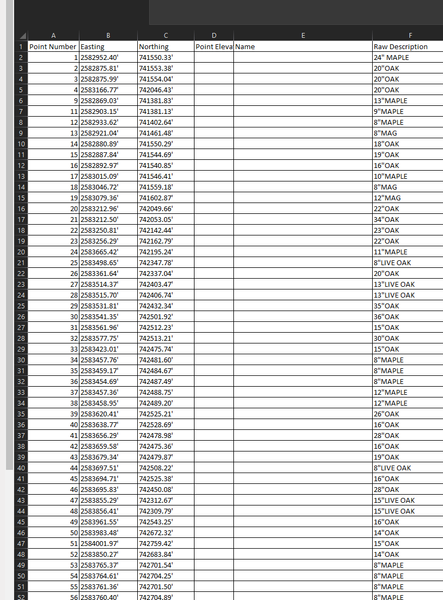
Currently I am reading through this table (first picture) and generating this table (second picture) My issue is that I have to manually search through the first table and manually input...
- Jul 14, 2023
Young_Grasshopper_EIT here is the file back with 2 options. The first uses power pivot and the second a custom formula. Both use an input to decide which tree type to filter for.

Young_Grasshopper_EIT
Jul 14, 2023Copper Contributor
Thank you for your quick reply! Here is the sample file! The large set of data at the top of the file will be different every time. I am trying to create a template file. Every time I need to use this file I will copy and paste that first table from another program. I then want to figure out how to pull the information needed to generate the tables seen on the "Protected Tree Total" sheet . I want to make the file as dynamic as possible so anybody can open it, copy and paste the first large table, and it will give them all the subsequent tables on sheet 2.

mtarler
Jul 14, 2023Silver Contributor
the file wasn't attached. If you can't attach it maybe upload and send link to it in Sharepoint, Onedrive, or similar.
In either case I recommend you make the first table 'Format as a Table' and then either the PivotTable or the formulas can reference that table by name and not worry about exactly how many rows of data there are.
In either case I recommend you make the first table 'Format as a Table' and then either the PivotTable or the formulas can reference that table by name and not worry about exactly how many rows of data there are.
- Young_Grasshopper_EITJul 14, 2023Copper ContributorI do apologize for that. It said that the xlsx file was not supported when I tried attaching it. I sent you a PM with the sample file attached! Thank you so very much for the help. I greatly appreciate it!
- mtarlerJul 14, 2023Silver Contributor
Young_Grasshopper_EIT here is the file back with 2 options. The first uses power pivot and the second a custom formula. Both use an input to decide which tree type to filter for.
- Young_Grasshopper_EITJul 14, 2023Copper ContributorThank you so much! I have been trying to wrap my head around how to do this for days! That custom formula is crazy. I kept trying to make a formula but I would get stuck trying to nest way too many if statements. I can't wait to dive into that custom code and the power pivot to see exactly how it works!