Forum Discussion

Guidance on a possible formula
- Dec 29, 2022
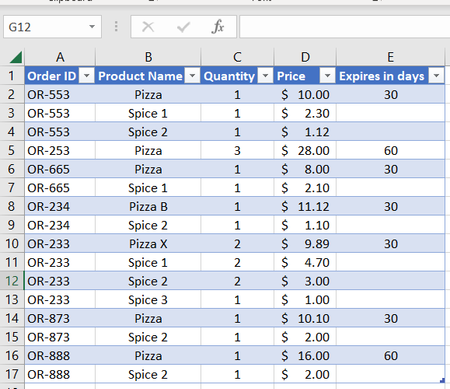
I'd add a helper column to the table. Name it Include and enter the formula
=COUNTIFS([Order ID],[@[Order ID]],[Product Name],"Pizza*",[Expires in days],30)*COUNTIFS([Order ID],[@[Order ID]],[Product Name],"Spice 2")
in row 2. This should propagate to the other rows automatically. The formula will return 1 for orders that meet the criteria, and 0 for the rest.
The fill order value of the orders meeting the criteria is
=SUMIFS(Orders[Price],Orders[Include],1)
where Orders is the name of the table.
See the attached sample workbook.

I'd add a helper column to the table. Name it Include and enter the formula
=COUNTIFS([Order ID],[@[Order ID]],[Product Name],"Pizza*",[Expires in days],30)*COUNTIFS([Order ID],[@[Order ID]],[Product Name],"Spice 2")
in row 2. This should propagate to the other rows automatically. The formula will return 1 for orders that meet the criteria, and 0 for the rest.
The fill order value of the orders meeting the criteria is
=SUMIFS(Orders[Price],Orders[Include],1)
where Orders is the name of the table.
See the attached sample workbook.
