Forum Discussion

anupambit1797
Jan 05, 2026Steel Contributor
Groupby or Filter function
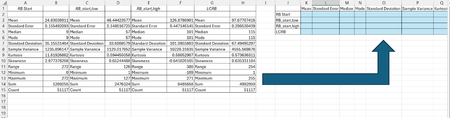
Dear Experts, Greetings! I have a data like below(Column A~H) and I want to export it in the format on right side( Column J~W):- Attached is the Worksheet. Br, Anupa...
- Jan 05, 2026
Maybe use TRANSPOSE instead:
=TRANSPOSE(CHOOSECOLS( B3:H15, 1, 3, 5, 7))


PeterBartholomew1
Jan 05, 2026Silver Contributor
Slightly more complicated
= LET(
      pairs,  WRAPROWS(TOCOL(data), 2),
      values, DROP(pairs,,1),
      WRAPCOLS(values, 4)
  )
It would also be possible to delete the table and work directly from the source data using GROUPBY along with the rather large array of statistical functions.

anupambit1797
Jan 05, 2026Steel Contributor
Thanks PeterBartholomew1 , can you please share the groupby solution you were mentioning above.
can we apply it on the below:-
Br,
Anupam
- PeterBartholomew1Jan 06, 2026Silver Contributor
Your question assumes the statistical analysis is complete and you simply need to reformat them.
I was just pointing out the alternative option of performing the statistics in a manner that would output the results you require directly (depending upon the raw data format)
= GROUPBY(group, value, HSTACK(AVERAGE, MEDIAN, MODE),,0)