Forum Discussion

Go with use of a macro to other sheet and in the table in this sheet, go to first empty row
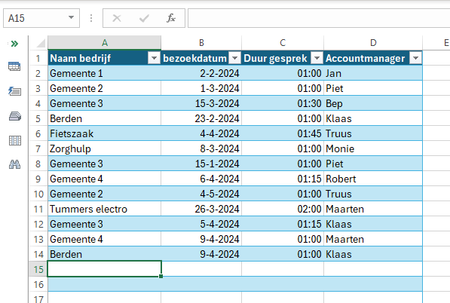

For example:
Sub GoToNextRow()
    With Worksheets("Bezoeken")
        Application.Goto Reference:=.Range("A" & .Rows.Count).End(xlUp).Offset(1), Scroll:=True
    End With
End Sub
If you want the next available cell to be selected automatically when the workbook is opened:
In the Visual Basic Editor, in the Project Explorer pane on the left, double-click ThisWorkbook (under Microsoft Excel Objects).
Copy the following code into the ThisWorkbook module:
Private Sub Workbook_Open()
    Call GoToNextRow
End Sub Diana1005Apr 12, 2024Tin Contributor
Thank you for your quick response.
It almost works. But the Sheet "Bezoeken"contains a table and with your code
Call GoToNextRow
Excel goes automatically to the last row of the table and not to the first available empty cell in the first empty row even when it is in a table.
Is that also possible to create? That when Excel opens, that Excel automatically goes to the first empty cal in the first empty row even this row is in a table?So everytime someone filles in data in a row and Excel saves automatically the data or the Excel worksheet will be closed, and Excel will be started again, that the cursor goes to the first available cell in the first empty row in the sheet?
Hopefully that is possible.
Looking forward to your reply.
With regards,
Diana- HansVogelaarApr 12, 2024MVP
Try this version:
Sub GoToNextRow() Application.Goto Reference:=Worksheets("Bezoeken").Range("A1").End(xlDown).Offset(1), Scroll:=True End Sub- Diana1005Apr 16, 2024Tin ContributorHoi Hans,
thank you for your help. It works.
With regards, (Groetjes)
Diana