Forum Discussion

Giving value based on cell color
- Apr 04, 2020
RubyBlade888 Interesting question. Most of the time one would want to color a cell based on some condition. You want to fill a cell with a number based on its color.
A small bit of VBA in a User Defined Function can read the cell color. Once you know that you can use the color number in an IF statement. Fun to play around with, but I wonder why you would bother to color a cell first (manually, I suppose) and then fill them with a number. Better to select the cells first, put the number in them and then do Conditional Formatting to color all cells based on the number it contains. No need for macros or IF statements.
Anyhow, the attached file contains a working example of what you asked for. Note that the user defined function is (re)executed as soon as you enter something in a cell and press Enter.

RubyBlade888 Interesting question. Most of the time one would want to color a cell based on some condition. You want to fill a cell with a number based on its color.
A small bit of VBA in a User Defined Function can read the cell color. Once you know that you can use the color number in an IF statement. Fun to play around with, but I wonder why you would bother to color a cell first (manually, I suppose) and then fill them with a number. Better to select the cells first, put the number in them and then do Conditional Formatting to color all cells based on the number it contains. No need for macros or IF statements.
Anyhow, the attached file contains a working example of what you asked for. Note that the user defined function is (re)executed as soon as you enter something in a cell and press Enter.
 RubyBlade888Apr 04, 2020Copper Contributor
Riny_van_Eekelen thanks a lot! this is really helpful.
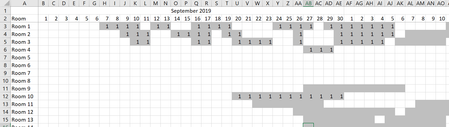
at the beginning, I was trying to see the room allocation of this hotel. so, i got the check-in date and the length of stay. the grey color means the room is occupied. and then i want to see the occupancy rate. im trying to find an excel formula to count colored cells (without number). but i couldnt find it. most of the formula i found is to count the value on specific color background. so thats why i need to put "1" to all grey cells.... but the data is too much to do by manual (5 years data...)
- Riny_van_EekelenApr 04, 2020Platinum Contributor
RubyBlade888 OK and understood. Then I hope that my little tool will help you achieving your goal.