Forum Discussion

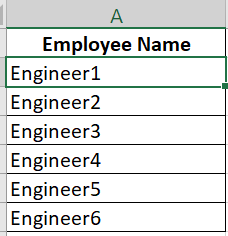
Get unique employee from 2 columns in 2 different worksheets
- Apr 06, 2022
Try the following formula:
=SUM(--ISNUMBER(FIND(Employee!$A$2:$A$7,$G2)))-(LEN($G2)-LEN(SUBSTITUTE($G2,",","")))-1

What should happen if you have Engineer2, Engineer7 in a cell?
 RohitChauhanApr 06, 2022Copper Contributor
HansVogelaar Thanks for reply, Engineer 7 is not in Employees worksheet, so the cell should be highlighted.
- HansVogelaarApr 06, 2022MVP
Try the following formula:
=SUM(--ISNUMBER(FIND(Employee!$A$2:$A$7,$G2)))-(LEN($G2)-LEN(SUBSTITUTE($G2,",","")))-1
- RohitChauhanApr 06, 2022Copper Contributor
Hi HansVogelaar,
Apologies for not stating the problem in dummy data correctly, when I applied the same formula in my project data, it is highlighting all the cells in G column, as A column of Employee sheet actually has duplicate employees for different dates.I am not able to figure it out how to modify the formula to work in my condition!
Can you please help again?Regards
Rohit