Forum Discussion

Get Pivot Data
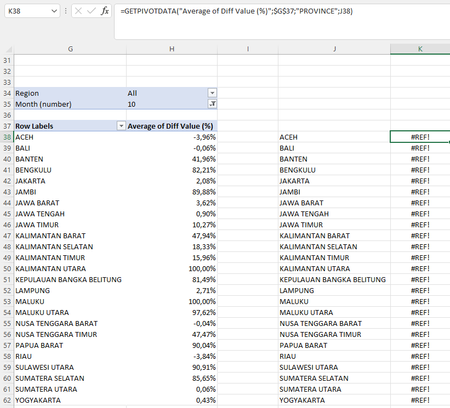
- Dec 02, 2021
In the empty cell you may start typing = when click on cell within PivotTable, e.g. on H38, Enter, it returns correct formula which you may adjust with parameters. Before that check if this setting is ON
I guess it shall be not "PROVINCE" but something like "[MyTable].[Province]", etc.

In the empty cell you may start typing = when click on cell within PivotTable, e.g. on H38, Enter, it returns correct formula which you may adjust with parameters. Before that check if this setting is ON
I guess it shall be not "PROVINCE" but something like "[MyTable].[Province]", etc.
 mikhailwisnuDec 09, 2021Copper Contributor
Thank you so much for your feedback, and it works!
as you said, at the last formula it must field;item so i rewrite it to:
=GETPIVOTDATA("[Measures].[Average of Diff Value (%)]";pivot_table;"[Table7].[PROVINCE]";"[Table7].[PROVINCE].&[JAKARTA]")
after that i rewrite the province name for each field;item per row and the map chart works fine
- SergeiBaklanDec 10, 2021Diamond Contributor
Good to know it helped, thank you for the feedback