Forum Discussion

Get Liquidation Period
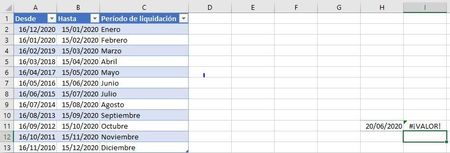
- Jun 20, 2020
denisemartincaldareri Not sure I understand your date ranges. The first one says from 16-12-2020 to 15-01-2020. How would that work? The next is from 16-01-2020 to 15-02-2020. Thereafter, the start date goes back 11 months in time and the end date goes forward one month.
Perhaps you just want to determine the termination month based on the termination date. If before the 15th then same month. If equal to or after the 15th then next month. If so, the formula could be:
=IF(DAY(H11)<15,TEXT(EDATE(H11,0),"Mmmm"),TEXT(EDATE(H11,1),"Mmmm"))=SI(DIA(H11)<15;TEXTO(FECHA.MES(H11;0);"Mmmm");TEXTO(FECHA.MES(H11;1);"Mmmm"))

Hi, Riny_van_Eekelen ! Thanks for your quick reply! Yes, I made a mistake in the example I sent, the Liquidation Period starts the 16th of the previous month and ends the 15th of the current month. Your formula works perfectly fine, I just added a "=" symbol to the formula so as to consider the day number 15th on the previous month.
Now it looks like this!
=SI(DIA(H41)<=15;TEXTO(FECHA.MES(H41;0);"Mmmm");TEXTO(FECHA.MES(H41;1);"Mmmm"))Thank you!!!

denisemartincaldareri Great! You're welcome.