Forum Discussion

Gantt Chart without weekends
- Nov 15, 2024
In columns H and I, change formulas such as
=I9-D9
to
=WORKDAY(I9, -D9)

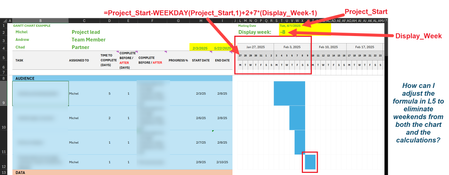
Thank you HansVogelaar and Kidd_Ip I'm attaching a sample with the recommended changes. L5 is the cell I've been changing.
LMK if you can't access this. https://docs.google.com/spreadsheets/d/1t1P8IBDLoXrytMGfEA3N1Ko_MrdoWoNC/edit?usp=drive_link&ouid=109580642755491160878&rtpof=true&sd=true

I get "Access Denied"
- MichelBrysonNov 14, 2024Copper Contributor
HansVogelaarsorry about that, I updated the settings so this should work now. https://docs.google.com/spreadsheets/d/1t1P8IBDLoXrytMGfEA3N1Ko_MrdoWoNC/edit?usp=sharing&rtpof=true&sd=true
- HansVogelaarNov 14, 2024MVP
See the attached version. I changed the formulas in M5 and to the right, and I changed row 4 to display 5-day weeks.
- MichelBrysonNov 15, 2024Copper Contributor
Thank you HansVogelaar ! This is getting so close now... the one thing, and I don't know if this can be changed, is how to set the dates based on the length of task (time to complete) without including weekends. Our projects (the ones we can plan for LOL) work back from a launch date. I'm trying to set up a base template so that we can add the tasks that need to be completed, how long each task takes and essentially use the calculations to determine the date we need to start the project in order to meet that end launch date.
The base calculation I've been using is just subtracting dates and Days to Complete, which doesn't take weekends out of the equation. Those are the Start and End dates in columns H and I.
I tried adding "WORKDAY" to the calculation but that didn't work. Do you know if it's possible to calculate for workdays and not weekends?