Forum Discussion

jcza01
Jan 19, 2024Copper Contributor
Function Arguments
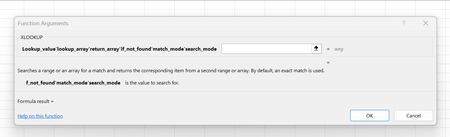
Function Arguments not displaying as separate input boxes but rather all in line.

jcza01
Jan 19, 2024Copper Contributor
Thank you for the response but what you are describing is exactly what I am doing.
The Function Arguments dialog does not display correctly and this is the problem.
I am using Microsoft 365 Apps for Enterprise.
I have uninstalled and reinstalled.
I tried the Repair function.
I checked the Options.
I verified the Regional Settings.
I logged a ticket with Microsoft and they told me to repair, reinstall etc.
The Function Arguments dialog does not display correctly and this is the problem.
I am using Microsoft 365 Apps for Enterprise.
I have uninstalled and reinstalled.
I tried the Repair function.
I checked the Options.
I verified the Regional Settings.
I logged a ticket with Microsoft and they told me to repair, reinstall etc.

NikolinoDE
Jan 19, 2024Platinum Contributor
Maybe you can test the behavior with a different user profile on the same computer. If the issue does not occur with a new user profile, there might be something specific to your user profile causing the problem.
Try safe Start, Pressing Ctrl while (double-)clicking on an Excel file icon. You must double click on the Excel program icon while pressing and holding Ctrl.
Make sure your Windows operating system is also up to date. Some compatibility issues between Windows and Office can be resolved through updates.
I'm at my wit's end here too. I hope I could at least help a little.
- jcza01Jan 25, 2024Copper ContributorThank you for the reply. I tried Safe mode but result is the same. I have also uninstalled (again) and reinstalled as requested by Microsoft Support but still the same.
 MelbaLittleFeb 12, 2024Copper ContributorAny update?
- jcza01Feb 22, 2024Copper ContributorIssue resolved. Regional format had Field Separator as ' instead of ,