Forum Discussion

Function Arguments
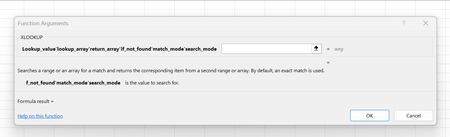

If you are experiencing an issue where the arguments of the XLOOKUP function are not displaying as separate input boxes in Excel, it might be due to the regional settings or Excel settings on your computer. However, the specific behavior can depend on the version of Excel you are using.
Here are some steps you can take to troubleshoot and resolve the issue:
- Use the Function Arguments Dialog:
- After typing the XLOOKUP function, you can use the "Insert Function" button (fx) next to the formula bar or use the shortcut Ctrl + A to open the Function Arguments dialog.
- In the Function Arguments dialog, each argument is displayed in a separate box, making it easier to input the values.
- Ensure Correct Syntax:
- Make sure your XLOOKUP formula has the correct syntax.
For example:
=XLOOKUP(lookup_value, lookup_array, return_array, [if_not_found], [match_mode], [search_mode])
- Arguments enclosed in square brackets [ ] are optional.
- Regional Settings:
- Check your computer's regional settings. Sometimes, the use of commas or semicolons as argument separators can vary based on regional settings.
- Go to Control Panel > Clock and Region > Region > Formats and ensure that your format is set correctly.
- Excel Options:
- Check Excel options for any settings related to formula input.
- Go to File > Options > Advanced and look for options related to formulas or function input.
- Update Excel:
- Ensure that your Excel version is up to date. Sometimes, updating Excel can resolve issues related to the user interface.
- Repair Microsoft Office:
- If the issue persists, you can try repairing your Microsoft Office installation.
- Go to Control Panel > Programs > Programs and Features, select Microsoft Office, and choose "Change." Then, select the option to repair Office.
- Check for Add-ins:
- Sometimes, third-party Excel add-ins can interfere with the normal behavior. Try disabling add-ins to see if the issue persists.
If the problem continues, providing more details about your Excel version (Excel 2019, 365, etc.), your operating system, and storage medium and any specific settings you've configured might help in offering more targeted assistance. The text and steps were edited with the help of AI.
My answers are voluntary and without guarantee!
Hope this will help you.
Was the answer useful? Mark as best response and Like it!
This will help all forum participants.
 jcza01Jan 19, 2024Copper ContributorThank you for the response but what you are describing is exactly what I am doing.
The Function Arguments dialog does not display correctly and this is the problem.
I am using Microsoft 365 Apps for Enterprise.
I have uninstalled and reinstalled.
I tried the Repair function.
I checked the Options.
I verified the Regional Settings.
I logged a ticket with Microsoft and they told me to repair, reinstall etc.- NikolinoDEJan 19, 2024Platinum Contributor
Maybe you can test the behavior with a different user profile on the same computer. If the issue does not occur with a new user profile, there might be something specific to your user profile causing the problem.
Try safe Start, Pressing Ctrl while (double-)clicking on an Excel file icon. You must double click on the Excel program icon while pressing and holding Ctrl.
Make sure your Windows operating system is also up to date. Some compatibility issues between Windows and Office can be resolved through updates.
I'm at my wit's end here too. I hope I could at least help a little.
- jcza01Jan 25, 2024Copper ContributorThank you for the reply. I tried Safe mode but result is the same. I have also uninstalled (again) and reinstalled as requested by Microsoft Support but still the same.