Forum Discussion

FREQUENCY() bug or floating point error?
- Jun 17, 2019
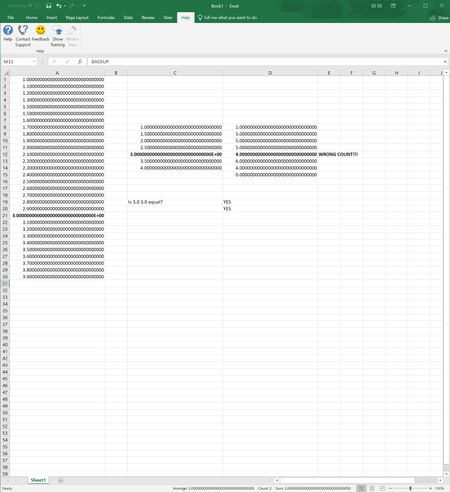
When I save the workbook and look into the XML data I see numbers like this:
1.1000000000000001
1.3000000000000003
1.5000000000000004
2.2999999999999998
3.9000000000000026
Definitely floating point error.


(Coming late to the party, I know. But FYI....)
HarishVangala wrote: ``the only way is that we must go to the underlying XML files and verify the numbers``.
Actually, no. We can verify the differences directly in Excel.
In your example, enter formulas of the form =MATCH(ROUND(A1,1),A1,0) into E1:E14. Or more generally, =MATCH(--(A1&""),A1,0).
The #N/A errors demonstrate that the internal binary values starting in A3 are not the same as the decimal representations, which Excel arbitrarily limits to 15 significant digits (rounded).
Moreover, you can calculate the difference by entering formulas of the form
=SUM(A1,-(A1&"")) into F1:F14, formatted as General or (better) Scientific.
0.00E+00 is exact zero.
Numbers of the form 2.22E-16 are the approximate difference between internal binary values and their decimal representation that is limited to 15 significant digits.
(Caveat: Formulas of the form =A1-(A1&"") do not always show the infinitesimal difference, due to a dubious "trick" that Excel applies inconsistently hide the differences.)
You can avoid the binary anomalies by the changing the formulas in A2:A14 to the form =ROUND(A1+0.1,1).
-----
HarishVangala wrote: ``this is not the infamous fundamental precision problems with floating point numbers. This is the problem with the design inconsistency among EXCEL's basic functions``
It is both.
The root cause is anomalies associated with 64-bit binary floating-point arithmetic, which is not limited to Excel. The anomalies are considered to be industry-accepted design trade-offs of that binary form. They are not considered bugs. They are not limited to Excel.
However, Excel compounds the problem by design inconsistencies, which apply to basic "operations" (notably subtraction and comparisons) as well as some "basic functions". I agree that the design inconsistencies should be considered defects.
----
HarishVangala wrote: ``For example, IF() and its family handle 15 decimal digits only, where as FREQUENCY and others handle 17 decimal digits``
It is just as misleading to think that Excel "stores" or "uses" 17-digit precision as it is to think that Excel "stores" 15-digit precision, a common misstatement in documentation.
It is true that Excel stores up to 17-digit precision in XML. But the 17-digit decimal representations are still just approximations.
The IEEE 794 standard specifies that 17 significant decimal digits are necessary and sufficient to convert between the 64-bit binary floating-point and the decimal representation with no loss of precision.
Nevertheless, Excel stores the exact binary value into memory when the application is running.
For example, the 15-digit approximation of =1/3 is 0.333333333333333, and the 17-digit approximation is 0.33333333333333331.
But the exact decimal representation of the internal binary is 0.333333333333333,314829616256247390992939472198486328125.
(I use period for the decimal point and comma to demarcate the first 15 significant digits.)