Forum Discussion

Marvin Oco
Sep 12, 2019Steel Contributor
FORMULA TO MERGE ALL CELL ITEM IN ABC COLUMN TO D
WHAT IS the FORMULA TO MERGE ALL CELL ITEM IN ABC COLUMN TO D? please see attached
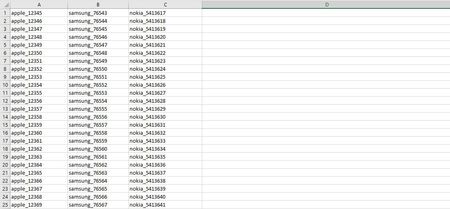
- Sep 12, 2019
If you are open to a VBA Solution, please find the attached and click the button called "Merge Multiple Columns Into One" on Sheet1 to merge all the columns with data on Sheet1 and get the data in a single column in the next empty column. e.g. if the sheet has 3 columns, the code will combine all the data and place the output in 4th column i.e. column D. Similarly if the sheet has 10 columns, the code will combine all the data and place the output in 11th column i.e. column K.
Sub MergeMultipleColumnsIntoOne()
Dim lr  As Long
Dim lc  As Long
Dim i   As Long
Dim j   As Long
Dim k   As Long
Dim x   As Variant
Dim y() As Variant

lr = Cells.Find("*", SearchOrder:=xlByRows, SearchDirection:=xlPrevious).Row
lc = Cells(1, Columns.Count).End(xlToLeft).Column

x = Range(Cells(1, 1), Cells(lr, lc)).Value
ReDim y(1 To UBound(x, 1) * UBound(x, 2), 1 To 1)

For j = 1 To UBound(x, 2)
    For i = 1 To UBound(x, 1)
        If x(i, j) <> "" Then
            k = k + 1
            y(k, 1) = x(i, j)
        End If
    Next i
Next j
Cells(1, lc + 1).Resize(k, 1).Value = y
End Sub

Marvin Oco
Sep 13, 2019Steel Contributor
thanks! vba worked

Subodh_Tiwari_sktneer
Sep 13, 2019Silver Contributor
You're welcome Marvin Oco! Glad it worked as desired.