Forum Discussion

Formula to Duplicate Entire Rows Based on Cell Value
 Mar 28, 2022
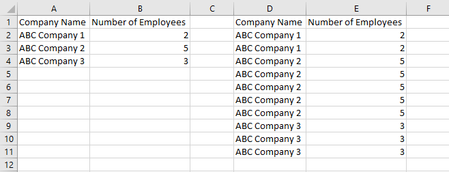
Sub companyemployees() Dim i As Double Dim j As Double Dim z As Double Dim w As Double For i = 2 To 1000 j = Cells(i, 2).Value For z = 2 To j + 1 Cells(z + w, 4).Value = Cells(i, 1).Value Cells(z + w, 5).Value = Cells(i, 2).Value Next z w = w + z - 2 Next i End SubMaybe with these lines of VBA code. Click the button in cell G2 in the attached file to start the macro.
Sub product()

Dim i As Double
Dim j As Double
Dim z As Double
Dim k As Long
Dim w As Double

Range("K:Q").Clear

k = Range("A" & Rows.Count).End(xlUp).Row

For i = 2 To k

j = Cells(i, 4).Value

For z = 2 To j + 1

Cells(z + w, 11).Value = Cells(i, 1).Value
Cells(z + w, 12).Value = Cells(i, 2).Value
Cells(z + w, 13).Value = Cells(i, 3).Value
Cells(z + w, 14).Value = Cells(i, 4).Value
Cells(z + w, 15).Value = Cells(i, 5).Value
Cells(z + w, 16).Value = Cells(i, 6).Value
Cells(z + w, 17).Value = Cells(i, 7).Value

Next z
w = w + z - 2

Next i

End Sub
In the attached file in sheet "Tabelle2" you can click the button in cell I2 to run the macro that returns the result in columns K to Q.
Good day!
Hi! OliverScheurich and all,
Can you please help me on my macro excel for entire rows. Below is a mock photo of what I am hoping to accomplish: Thank you!
- OliverScheurichJul 23, 2024Gold Contributor
Sub net()

Dim i As Long, j As Long, k As Long, l As Long

Range("X3:Z1048576").Clear
l = 3

For j = 2 To 6
For i = 3 To 5

For k = 1 To Cells(i, j).Value

Cells(l, 24).Value = Cells(i, 1).Value
Cells(l, 25).Value = k
Cells(l, 26).Value = Cells(2, j).Value

l = l + 1

Next k

Next i
Next j


End Sub
This macro returns the overall result in column X to Z in my sample file.
- RodelioFJul 24, 2024Copper Contributor
Great! you are so amazing !OliverScheurich . I hope I can have also a formula for this macro. Thank you!
- OliverScheurichJul 24, 2024Gold Contributor
=LET(rg,DROP(REDUCE("",SEQUENCE(,COLUMNS(B3:F5)),
LAMBDA(x,y,VSTACK(x,DROP(
REDUCE("",SEQUENCE(ROWS(INDEX(B3:F5,,y))),
LAMBDA(u,v,
VSTACK(u,IFERROR(
HSTACK(
EXPAND(INDEX(A3:A5,v),INDEX(INDEX(B3:F5,,y),v),,INDEX(A3:A5,v)),
SEQUENCE(INDEX(INDEX(B3:F5,,y),v)),EXPAND(INDEX(B2:F2,,y),INDEX(INDEX(B3:F5,,y),v),,INDEX(B2:F2,,y))),
HSTACK("","",""))))),1)))),1),
FILTER(rg,LEN(CHOOSECOLS(rg,1))>0))This formula can be applied to return the overall result if one works with Office 365 or Excel for the web.