Forum Discussion

formula to auto entry an amount based on the kind
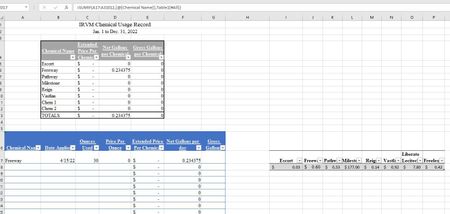

That VLOOKUP is incomplete.
I think would be the correct formulation. Here's a screen grab on the correct syntax for VLOOKUP from one of my favorite on=line references ( https://exceljet.net/excel-functions/excel-vlookup-function )
You have the formula written as =VLOOKUP([@[Chemical Name]],Table1[Chemical],Table1[per Ounce])
It should be more along these lines
=VLOOKUP([@[Chemical Name]],Table1,2,0)
- In short, I think you're specifying the lookup_value correctly, but not the rest.
- table_array would be simply "Table1"
- column_index_num would be 2 for the second column of Table 1
- and 0 would be requesting an exact match
If making that change doesn't work, refer to the website I link to above. If you still can't resolve it, please post a copy of the actual spreadsheet either here or in OneDrive or Google Drive or the equivalent, and give us a link

mathetes I also am having this issue. I have a spread sheet with names, elevations and columns for each material with the quantity being used. I need to get the material quantities to auto populate when the elevation is selected from a drop down menu and can’t figure out how to get that to work.
- mathetesApr 20, 2022Gold ContributorYou'd need to provide more information, an image of the sheet at the very least, but ideally a copy of the actual spreadsheet posted to a shareable website like OneDrive or Google.
- Dtrout16Apr 21, 2022Copper Contributor
mathetes I have a link below. What I’m trying to do is get a drop down menu in columns next to each other and then the final one to populate the counts in the correct columns.
I want to have any builder we use names, when one is selected it brings up the plans for that specific builder in a drop down menu, when a plan is then selected in the drop down I’m trying to get the amount of material needed to populate in the corresponding columns next to it. Currently these all need to manually be entered and it’s time consuming.for instance the first column would select any one of our builders In the tabs below, lets say we choose MI tab, in the next column I want it generate only the the MI plan names, buckingham, flintwick etc on MI tab, once a plan is selected then next column would be elevation, using MI tab as example and say buckingham was chosen, It would then generate the next column options of elevations A,B,C. One an elevation is selected I need it to then auto populate the quantity of material needed in the columns next to it, example 30 yr bundles, 25 yr bundles, starter bundles etc…
https://docs.google.com/spreadsheets/d/17VNpTYIZcuo0rC-Ssk5we2qXsppxn-sC/edit?usp=sharing&ouid=105052994483525096198&rtpof=true&sd=true
- mathetesApr 22, 2022Gold Contributor
I haven't the slightest idea (nor the time to figure out) how to navigate that many-layered workbook. I'd be happy to offer some help, but you need to give me (or others here) quite a bit more guidance on where you want this to happen. You are very familiar with what each tab represents, to say nothing of what each column and each row represent, and it probably seems obvious to you where the help is needed.
It isn't obvious to somebody fresh to the scene. If we were sitting down face-to-face, you could walk us through in a matter of minutes. That's not easy in text messages (or message board posts such as this), but that's the challenge to you. Come up with a clear description of what we're looking at and pick one or two spots, clearly delineated, where you want work done and then articulate what those desired results are....