Forum Discussion

formula to auto entry an amount based on the kind
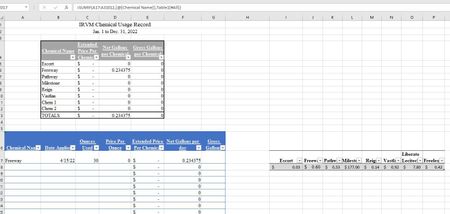

I am still struggling. I have one table that has a drop down list, when someone clicks on a name from the drop down list, I need the price per ounce to auto populate in that same table. I tried to use the following and get an error.
=VLOOKUP([@[Chemical Name]],Table1[Chemical],Table1[per Ounce])
If there is a better way to show this to you please let me know.
Thanks for any help.
- mathetesApr 20, 2022Gold Contributor
That VLOOKUP is incomplete.
I think would be the correct formulation. Here's a screen grab on the correct syntax for VLOOKUP from one of my favorite on=line references ( https://exceljet.net/excel-functions/excel-vlookup-function )
You have the formula written as =VLOOKUP([@[Chemical Name]],Table1[Chemical],Table1[per Ounce])
It should be more along these lines
=VLOOKUP([@[Chemical Name]],Table1,2,0)
- In short, I think you're specifying the lookup_value correctly, but not the rest.
- table_array would be simply "Table1"
- column_index_num would be 2 for the second column of Table 1
- and 0 would be requesting an exact match
If making that change doesn't work, refer to the website I link to above. If you still can't resolve it, please post a copy of the actual spreadsheet either here or in OneDrive or Google Drive or the equivalent, and give us a link
 Dtrout16Apr 20, 2022Copper Contributor
mathetes I also am having this issue. I have a spread sheet with names, elevations and columns for each material with the quantity being used. I need to get the material quantities to auto populate when the elevation is selected from a drop down menu and can’t figure out how to get that to work.
- mathetesApr 20, 2022Gold ContributorYou'd need to provide more information, an image of the sheet at the very least, but ideally a copy of the actual spreadsheet posted to a shareable website like OneDrive or Google.
