Forum Discussion

Formula Help
- Apr 05, 2022
Well, I came up with a different answer. There no doubt is a more elegant way to do it, but this I based on a sheet I'd created to do US tax calculations. It involves a table, with variables to use in calculating the sample required based on a volume lookup (except I use MATCH) to determine which row of the table is applicable. I've attached the file for you.
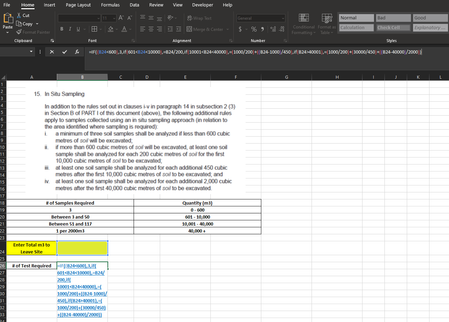
Here's what the area looks like.
There's one formula, and this is it.
=CHOOSE(MATCH(A13,A2:A6,1),3,B3+INT((A13-H3)/F3),B4+INT((A13-H4)/F4),B5+INT((A13-H5)/F5))
The starting point is to identify which row to work with. The MATCH(A13,A2:A6,1) portion does that, getting a number from 1 to 4.
CHOOSE, then, picks the relevant value from the rest based on that 1-4 number
1 delivers the result 3
2 delivers the result B3+INT((A13-H3)/F3)
3 delivers the result B4+INT((A13-H4)/F4)
and 4, the result B5+INT((A13-H5)/F5)


Well, I came up with a different answer. There no doubt is a more elegant way to do it, but this I based on a sheet I'd created to do US tax calculations. It involves a table, with variables to use in calculating the sample required based on a volume lookup (except I use MATCH) to determine which row of the table is applicable. I've attached the file for you.
Here's what the area looks like.
There's one formula, and this is it.
=CHOOSE(MATCH(A13,A2:A6,1),3,B3+INT((A13-H3)/F3),B4+INT((A13-H4)/F4),B5+INT((A13-H5)/F5))
The starting point is to identify which row to work with. The MATCH(A13,A2:A6,1) portion does that, getting a number from 1 to 4.
CHOOSE, then, picks the relevant value from the rest based on that 1-4 number
1 delivers the result 3
2 delivers the result B3+INT((A13-H3)/F3)
3 delivers the result B4+INT((A13-H4)/F4)
and 4, the result B5+INT((A13-H5)/F5)
- Travis_D1990Apr 05, 2022Copper ContributorThat works thank you!!!