Forum Discussion

Formula Help
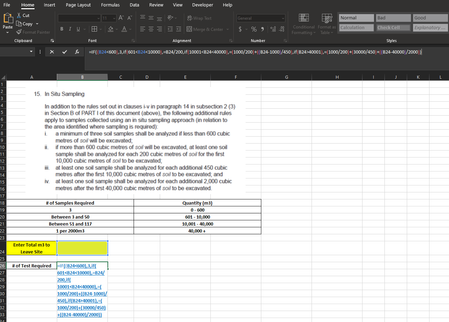
- Apr 05, 2022
Well, I came up with a different answer. There no doubt is a more elegant way to do it, but this I based on a sheet I'd created to do US tax calculations. It involves a table, with variables to use in calculating the sample required based on a volume lookup (except I use MATCH) to determine which row of the table is applicable. I've attached the file for you.
Here's what the area looks like.
There's one formula, and this is it.
=CHOOSE(MATCH(A13,A2:A6,1),3,B3+INT((A13-H3)/F3),B4+INT((A13-H4)/F4),B5+INT((A13-H5)/F5))
The starting point is to identify which row to work with. The MATCH(A13,A2:A6,1) portion does that, getting a number from 1 to 4.
CHOOSE, then, picks the relevant value from the rest based on that 1-4 number
1 delivers the result 3
2 delivers the result B3+INT((A13-H3)/F3)
3 delivers the result B4+INT((A13-H4)/F4)
and 4, the result B5+INT((A13-H5)/F5)

This has the look of an assignment in a class you may be taking. So it would be best if, as much as possible, you figured it out for yourself. I will say this much: check out the VLOOKUP function. It's what I'd use. https://exceljet.net/excel-functions/excel-vlookup-function
And in the range_lookup field, select TRUE or 1
 Travis_D1990Apr 05, 2022Copper ContributorThanks for the hint, this is for work not school, I'm trying to determine how many soil samples are required based on the quantity provided as layout out by the provincial regulations
- mathetesApr 05, 2022Gold Contributor
Well, I came up with a different answer. There no doubt is a more elegant way to do it, but this I based on a sheet I'd created to do US tax calculations. It involves a table, with variables to use in calculating the sample required based on a volume lookup (except I use MATCH) to determine which row of the table is applicable. I've attached the file for you.
Here's what the area looks like.
There's one formula, and this is it.
=CHOOSE(MATCH(A13,A2:A6,1),3,B3+INT((A13-H3)/F3),B4+INT((A13-H4)/F4),B5+INT((A13-H5)/F5))
The starting point is to identify which row to work with. The MATCH(A13,A2:A6,1) portion does that, getting a number from 1 to 4.
CHOOSE, then, picks the relevant value from the rest based on that 1-4 number
1 delivers the result 3
2 delivers the result B3+INT((A13-H3)/F3)
3 delivers the result B4+INT((A13-H4)/F4)
and 4, the result B5+INT((A13-H5)/F5)
- Travis_D1990Apr 05, 2022Copper ContributorThat works thank you!!!