Forum Discussion

Jagodragon
Jul 08, 2022Iron Contributor
Formula help expanding table?
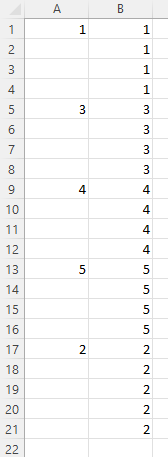
The subject is probably not a good summary of what I'm looking to do. But, It's the best could come up with. I would like to know if there is a way to take range A1:A21 and make it appear as rang...
 Jul 11, 2022
Thank you OliverScheurich
I didn't actually use your response because I needed to be able to set it for a specific range. But, you confirmed my fear that i would have to create a VBA function for this.
Here is the code I ultimately used.
Function Expand(x As Range) As Variant
'formula to expand values of a column range to fill all cell
'  =Expand(A1:A20) or =Expand(A1#)
    Application.Volatile

    Dim RET As Variant                                      'retun table
    Dim XVal                                                'vriable to hold current num
    Dim i                                                   'counter

    i = 1                                                   'presetting the counter
    XVal = 0                                                'presetting the initial set value

    ReDim RET(1 To x.Rows.Count, 0)                         'defineing the Return array
    For i = 1 To x.Rows.Count                               'For each cell in the intial range dor the following
        If IsNumeric(x(i).Value) = True And x(i) > 0 Then       'check if the value is a number greater than 0
            XVal = x(i).Value                                       'if it is a nuber greater than zero,set the pass thru value to cell value
        End If                                                  '
        RET(i, 0) = XVal                                        'set cell value to updated pass thru value
    Next i                                                  '
    Expand = RET                                            'sends the processed information back to the excel sheet thru formula
End Function

OliverScheurich
Jul 08, 2022Gold Contributor
Sub fill()

Dim MaxRow As Long
Dim i As Long

MaxRow = Cells(Rows.Count, 1).End(xlUp).Row

For i = 1 To MaxRow

Cells(i, 2).Value = Cells(i, 1).Value
If Cells(i, 1) <> "" Then

Else
Cells(i, 2).Value = Cells(i - 1, 2).Value

End If

Next i

End Sub
Assuming that there is always a value in cell A1 you can try these lines of code. In the attached file you can click the button in cell E2 to start the macro.
Jagodragon
Jul 11, 2022Iron Contributor
Thank you OliverScheurich
I didn't actually use your response because I needed to be able to set it for a specific range. But, you confirmed my fear that i would have to create a VBA function for this.
Here is the code I ultimately used.
Function Expand(x As Range) As Variant
'formula to expand values of a column range to fill all cell
'  =Expand(A1:A20) or =Expand(A1#)
    Application.Volatile

    Dim RET As Variant                                      'retun table
    Dim XVal                                                'vriable to hold current num
    Dim i                                                   'counter

    i = 1                                                   'presetting the counter
    XVal = 0                                                'presetting the initial set value

    ReDim RET(1 To x.Rows.Count, 0)                         'defineing the Return array
    For i = 1 To x.Rows.Count                               'For each cell in the intial range dor the following
        If IsNumeric(x(i).Value) = True And x(i) > 0 Then       'check if the value is a number greater than 0
            XVal = x(i).Value                                       'if it is a nuber greater than zero,set the pass thru value to cell value
        End If                                                  '
        RET(i, 0) = XVal                                        'set cell value to updated pass thru value
    Next i                                                  '
    Expand = RET                                            'sends the processed information back to the excel sheet thru formula
End Function