Forum Discussion

Jagodragon
Jul 08, 2022Iron Contributor
Formula help expanding table?
The subject is probably not a good summary of what I'm looking to do. But, It's the best could come up with. I would like to know if there is a way to take range A1:A21 and make it appear as rang...
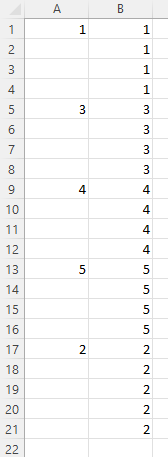
 Jul 11, 2022
Thank you OliverScheurich
I didn't actually use your response because I needed to be able to set it for a specific range. But, you confirmed my fear that i would have to create a VBA function for this.
Here is the code I ultimately used.
Function Expand(x As Range) As Variant
'formula to expand values of a column range to fill all cell
'  =Expand(A1:A20) or =Expand(A1#)
    Application.Volatile

    Dim RET As Variant                                      'retun table
    Dim XVal                                                'vriable to hold current num
    Dim i                                                   'counter

    i = 1                                                   'presetting the counter
    XVal = 0                                                'presetting the initial set value

    ReDim RET(1 To x.Rows.Count, 0)                         'defineing the Return array
    For i = 1 To x.Rows.Count                               'For each cell in the intial range dor the following
        If IsNumeric(x(i).Value) = True And x(i) > 0 Then       'check if the value is a number greater than 0
            XVal = x(i).Value                                       'if it is a nuber greater than zero,set the pass thru value to cell value
        End If                                                  '
        RET(i, 0) = XVal                                        'set cell value to updated pass thru value
    Next i                                                  '
    Expand = RET                                            'sends the processed information back to the excel sheet thru formula
End Function

sivakumarrj
Jul 08, 2022Brass Contributor
Just try with =IF(A2="",B1,A2) and First Row should be header or blank.
| 1 | 1 |
| 1 | |
| 1 | |
| 1 | |
| 1 | |
| 2 | 2 |
| 2 | |
| 2 | |
| 2 | |
| 2 | |
| 3 | 3 |
| 3 | |
| 3 | |
| 3 | |
| 4 | 4 |
- JagodragonJul 08, 2022Iron ContributorThank you sivakumarrj. I am trying to get this to work with range formulas. so, i need this result but from a single formulas that looks at A1# (A1# = A1:A21). I can not use a copy and pasted formula as I need this to be a dynamic formula. that is to say that A1# could be 1 row, 1000 rows, or more possibly.
 OliverScheurichJul 08, 2022Gold Contributor
Sub fill() Dim MaxRow As Long Dim i As Long MaxRow = Cells(Rows.Count, 1).End(xlUp).Row For i = 1 To MaxRow Cells(i, 2).Value = Cells(i, 1).Value If Cells(i, 1) <> "" Then Else Cells(i, 2).Value = Cells(i - 1, 2).Value End If Next i End SubAssuming that there is always a value in cell A1 you can try these lines of code. In the attached file you can click the button in cell E2 to start the macro.
- JagodragonJul 11, 2022Iron Contributor
Thank you OliverScheurich
I didn't actually use your response because I needed to be able to set it for a specific range. But, you confirmed my fear that i would have to create a VBA function for this.
Here is the code I ultimately used.
Function Expand(x As Range) As Variant
'formula to expand values of a column range to fill all cell
'  =Expand(A1:A20) or =Expand(A1#)
    Application.Volatile

    Dim RET As Variant                                      'retun table
    Dim XVal                                                'vriable to hold current num
    Dim i                                                   'counter

    i = 1                                                   'presetting the counter
    XVal = 0                                                'presetting the initial set value

    ReDim RET(1 To x.Rows.Count, 0)                         'defineing the Return array
    For i = 1 To x.Rows.Count                               'For each cell in the intial range dor the following
        If IsNumeric(x(i).Value) = True And x(i) > 0 Then       'check if the value is a number greater than 0
            XVal = x(i).Value                                       'if it is a nuber greater than zero,set the pass thru value to cell value
        End If                                                  '
        RET(i, 0) = XVal                                        'set cell value to updated pass thru value
    Next i                                                  '
    Expand = RET                                            'sends the processed information back to the excel sheet thru formula
End Function