Forum Discussion

Formula help. Different variables
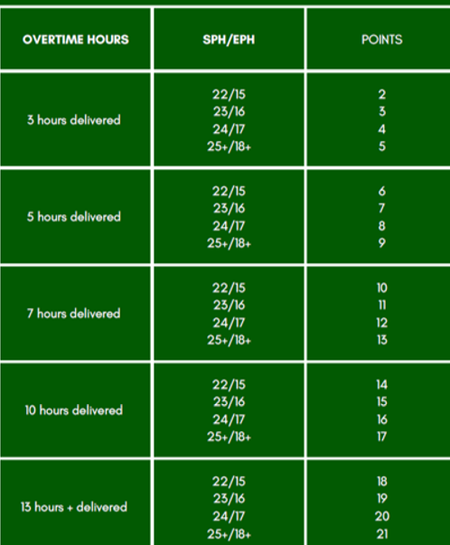
- Dec 04, 2022
LiamL2002 It does help.
this illustrates one way to solve this. Put all those criteria into a two-dimensional table, with OT hours across the top (the horizontal dimension), SPH/EPH values down the vertical dimension. And use INDEX and MATCH to select the appropriate number of points.
There would be other ways to arrange the data entry. You don't specify how you're going to use this, so this basically just illustrates the concept. All the work (once the data table is arrayed properly) is done by a single formula, in cell C14. A copy of the spreadsheet is attached.
=INDEX($C$4:$G$7,MATCH($C$13,$A$4:$A$7,0),MATCH($C$12,$C$2:$G$2,0))

Apologies,
So if someone has worked 3 hours of overtime up to 5 and then also hit the "22/15" SPH/EPH basically messages sent per hour. They would get the 2 points 23/16 the 3 points and so on. I started to struggle when I got to the 5-7 hours overtime criteria and hitting the 22/15 SPH/EPH and the points it then would assign.
It's a team incentive running to encourage overtime, but the team would gain more points if more overtime has been done and reached higher numbers towards their targets.
I hope this helps a little.

LiamL2002 It does help.
this illustrates one way to solve this. Put all those criteria into a two-dimensional table, with OT hours across the top (the horizontal dimension), SPH/EPH values down the vertical dimension. And use INDEX and MATCH to select the appropriate number of points.
There would be other ways to arrange the data entry. You don't specify how you're going to use this, so this basically just illustrates the concept. All the work (once the data table is arrayed properly) is done by a single formula, in cell C14. A copy of the spreadsheet is attached.
=INDEX($C$4:$G$7,MATCH($C$13,$A$4:$A$7,0),MATCH($C$12,$C$2:$G$2,0))
- LiamL2002Dec 04, 2022Copper ContributorThank you so much. This really does help! Sorry if I was a bit vague but I'm fairly new to Excel and wasn't really sure what can and cannot be done and wasn't with how it can be arranged etc.
- mathetesDec 04, 2022Gold Contributor
Sorry if I was a bit vague but I'm fairly new to Excel and wasn't really sure what can and cannot be done and wasn't with how it can be arranged etc.
We all begin "new with Excel" at some point. My own "newbie" point was about 45 years ago, with the early Lotus 1-2-3. In those days, software packages came with manuals; Lotus had a box with several VOLUMES of info on the various functions and what they could do. I read through them multiple times, generally once a year, always discovering another way to do something I'd been doing "the hard way."
Just so you know, Excel is marvelously powerful when it comes to processing or manipulating data (both numerical and textual). It has its limits, to be sure, but when it comes to data that can be arrayed in tables or database form, conditional reasoning, etc., etc., it's very powerful.
A key to unlocking that power is in being clear in your own mind on what you want done, key in conceptual ways, and able to describe that (to yourself or to somebody else) is plain old words. A mistake people often make here on these forum pages is to come in asking for help but describing their need in terms of formulas. You didn't do that, but nor did you describe the process you were trying to automate; you gave an image that had many implicit assumptions clear to you but not necessarily to those of whom you were asking assistance. Be aware of that, and try to articulate things from an "input"and "output" perspective, paying attention to what kind of data is at the "raw" end, what you want at the "results" end, and what happens in between.
Let me refer you to a website that I've often found helpful. In this case, here are links to the two functions that were key in solving your situation.
The website's homepage can be used to search for other functions by category.
Perhaps even more helpful to you, though, would be some basic books on Excel. Or search through the many instructional videos on YouTube.