Forum Discussion

formula help - vlookups doing weird stuff
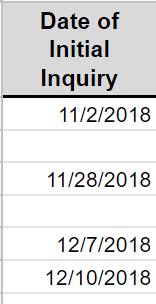

Here's what I've got:
Yes, the lookup is fetching values from a tab that holds all of the data. I'm trying to break the data into two tabs based on the vlookup criteria.
I've attached the file. Thank you!

Try this Array Formula which requires confirmation with Ctrl+Shift+Enter instead of Enter alone.
On Booked Sheet,
In A2
=IFERROR(INDEX('All Inquiries'!B$2:B$4,SMALL(IF('All Inquiries'!$A$2:$A$4="B",ROW('All Inquiries'!$A$2:$A$4)-ROW('All Inquiries'!$A$2)+1),ROWS(A$2:A2))),"")
Confirm with Ctrl+Shift+Enter and copy it across and down until you get blank cells.
Exactly same formula you need on Cold Sheet, only the criteria "B" will be replaced with "C" in the formula.
Please find the attached for more details.
If you have access to dynamic array formulas, you may try the Filter function like below...
In A2
=FILTER('All Inquiries'!B2:C4,'All Inquiries'!A2:A4="B","No record found!")
- JMcElwain1Oct 28, 2019Copper Contributor
Thank you so, so much!
I was able to get the formula working, but I'm still not able to get it to skip rows that don't match the criteria.
Despite being an insider, I don't have access to the FILTER function (yet).
I've attached the updated file for your review, I can't seem to figure out why its not ignoring a row when criteria doesn't match.
Thanks for the help!
Jeremy
- TwifooOct 29, 2019Silver Contributor
I prefer this flexible, non-array formula in Booked!A2 of the attached version of your file:
=IFERROR(INDEX('All Inquiries'!$B$2:$C$4,
AGGREGATE(15,6,(ROW('All Inquiries'!$A$2:$A$4)-1)/('All Inquiries'!$A$2:$A$4="B"),ROW()-1),
MATCH(A$1,'All Inquiries'!$B$1:$C$1,0)),"") - Subodh_Tiwari_sktneerOct 29, 2019Silver Contributor
That's because you forgot to lock the ranges used in the formula. The correct formula should be like below...
=IFERROR(INDEX('All Inquiries'!B$2:B$4,SMALL(IF('All Inquiries'!$A$2:$A$4="B",ROW('All Inquiries'!$A$2:$A$4)-ROW('All Inquiries'!$A$2)+1),ROWS(A$2:A2))),"")
