Forum Discussion

Formula Help - Stock control
 Mar 22, 2023
I assume you don't work with Office365. If so you have to enter the formula as a matrixformula with ctrl+shift+enter. This puts the curly brackets (highlighted in yellow in the screenshot) around the formula in older versions of Excel e.g. in my Excel 2013.
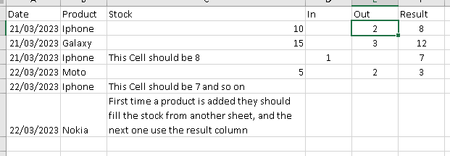
=IF(COUNTIF($B$2:B2,B2)=1,VLOOKUP(B2,$I$2:$J$5,2,FALSE),INDEX($F$2:F2,LARGE(IF($B$2:B2=B2,ROW($B$2:B2)-1),2)))You can try this formula. Enter the formula with ctrl+shift+enter if you don't work with Office 365 or Excel 2021. In the example the value for a product that is added for the first time is taken from the "inventory sheet" in columns I and J.
 AucesarMar 22, 2023MCT
- OliverScheurichMar 22, 2023Gold Contributor
I assume you don't work with Office365. If so you have to enter the formula as a matrixformula with ctrl+shift+enter. This puts the curly brackets (highlighted in yellow in the screenshot) around the formula in older versions of Excel e.g. in my Excel 2013.
- AucesarMar 22, 2023MCT
OliverScheurichThanks, missed it! Worked like a charm!