Forum Discussion

Miggymoo2019
Feb 28, 2019Copper Contributor
Formula Help - It's got me stumped!
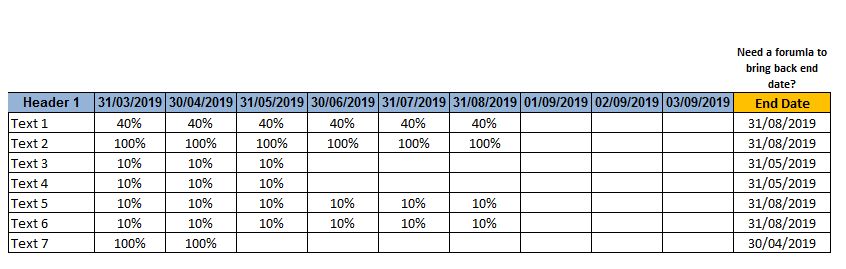
Hi everyone, Looking for a formula which I'm sure is possible but it's got me stumped. I have a table that I'm wanting to add a formula to that brings back the date in the table header based on the last populated cell. I have added a picture as an example. The example would be for "Text 1" row, based on the last cell being populated by 40% I would like it to return the end date of 31-08-19 (hope this is making sense). For "Text 7" row, based on the last cell being populated by 100% I would like it to return the end date of 30-04-19. Any help would be great. Thank you :-) Paula
- Assuming your screen shot is in A1:K8, your formula in K2, copied down to K8 is:
=INDEX(A$1:J$1,
COUNTA(A2:J2))

3 Replies
- TwifooSilver ContributorAssuming your screen shot is in A1:K8, your formula in K2, copied down to K8 is:
=INDEX(A$1:J$1,
COUNTA(A2:J2)) Miggymoo2019Copper Contributor
- TwifooSilver ContributorYou're very much welcome.