Forum Discussion

Formula help - daily pay vs supplement monthly payments
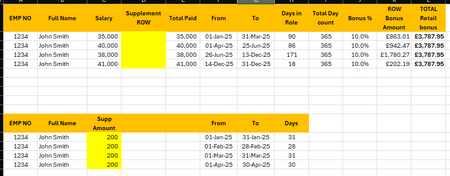

HelloBrirack77,
This is not a data structure issue. Excel can short circuit array evaluation when MIN and MAX logic is embedded directly inside SUMPRODUCT. When that happens one overlapping supplement row can be ignored.
The fix is to explicitly test for date overlap and then prorate by days. This method is deterministic and works for changing pay periods and calendar month supplements.
Corrected formula
=SUMPRODUCT((Supp!$A$2:$A$10000=$A2)(Supp!$D$2:$D$10000<=$G2)(Supp!$E$2:$E$10000>=$F2)(MIN($G2,Supp!$E$2:$E$10000)-MAX($F2,Supp!$D$2:$D$10000)+1)/Supp!$F$2:$F$10000Supp!$C$2:$C$10000)
Explanation
This forces an explicit date overlap test prevents Excel from skipping rows and correctly prorates supplements against any pay period.
Excel 365 LET version
=LET(Emp,$A2,PayFrom,$F2,PayTo,$G2,SuppEmp,Supp!$A$2:$A$10000,SuppFrom,Supp!$D$2:$D$10000,SuppTo,Supp!$E$2:$E$10000,SuppDays,Supp!$F$2:$F$10000,SuppAmt,Supp!$C$2:$C$10000,Overlap,(SuppEmp=Emp)(SuppFrom<=PayTo)(SuppTo>=PayFrom)(MIN(PayTo,SuppTo)-MAX(PayFrom,SuppFrom)+1),SUMPRODUCT(Overlap/SuppDaysSuppAmt))
For very large datasets Power Query avoids recalculation issues entirely.