Forum Discussion

Formula error
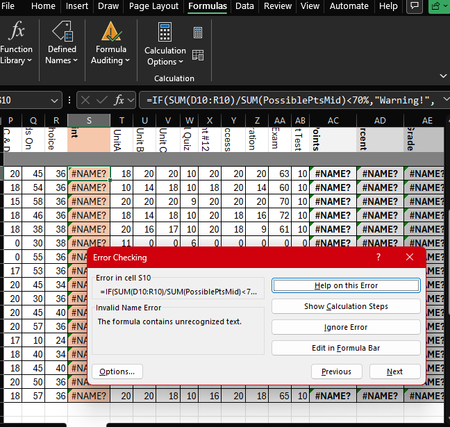

Excel doesn't know what PossiblePtsMid means. It's looking for a named range (a saved group of cells), but that name doesn't exist in your workbook yet.
The Fix (pick one):
Option 1 – Define the named range (best way)
If you have a row with the maximum points for each column (D through R):
- Select all those max-point cells (e.g., D1:R1).
- Go to Formulas > Define Name.
- Type PossiblePtsMid as the name, set Scope to Workbook, and click OK.
Your formula will now work.
Option 2 – Use a single total number
If you know the total maximum points (say 300):
- Type 300 into any empty cell.
- Select that cell, go to Formulas > Define Name, name it PossiblePtsMid, and click OK.
Option 3 – Quick shortcut (skip naming)
Just replace SUM(PossiblePtsMid) with the actual total number. For example:
=IF(SUM(D10:R10)/300<70%, "Warning!", "OK")
Note…
Your columns AC, AD, and AE also show #NAME? – they likely use other missing names. Fix them the same way (define those names or replace them with numbers).
That's it! Start with Option 1 if you have a points row.
My answers are voluntary and without guarantee!
Hope this will help you.