Forum Discussion

Formula Challenge: The most efficient way to generate a Number Spiral (Ulam spiral) ?
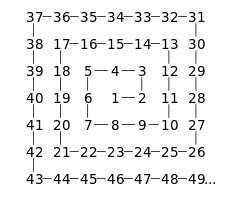

Patrick2788 Interesting challenge. I took a slightly different approach, starting from the center of the spiral and working my way outwards, offsetting the row or column number by either 1 or -1 at each step. I used TOCOL / IF / SEQUENCE as the primary method of array manipulation, then SORTBY to sort the numeric sequence by row and column number, and WRAPROWS to output the final results. Due to the row limitations of the SEQUENCE function, the maximum output size is 1023 rows by 1023 columns (1,046,529 numbers), but it only takes 3 seconds to process.
The complete definition of the LAMBDA function is:
ULAMSPIRAL:
=LAMBDA(rows,
    LET(
        n, rows + ISEVEN(rows),
        adj, DROP(TOCOL(IF({1,1}, SEQUENCE(n))), -1),
        row, DROP(TOCOL(IF(SEQUENCE(n), {0,1})), -1),
        off, DROP(DROP(TOCOL(IF(SEQUENCE(n), {1,1,-1,-1})), 1), -2),
        rId, DROP(TOCOL(IFS(adj >= SEQUENCE(, MAX(adj)), SEQUENCE(ROWS(adj))), 2), -1),
        r, INDEX(row, rId),
        k, INDEX(off, rId),
        s, ROUNDUP(n/2, 0),
        POS, LAMBDA(int,arr, VSTACK(int, SCAN(int, arr, LAMBDA(a,v, a+v)))),
        spiral, WRAPROWS(SORTBY(SEQUENCE(n^2), POS(s, r*k), 1, POS(s, NOT(r)*k), 1), n),
        DROP(spiral, rows-n, n-rows)
    )
)
It's set up a little different, in that you enter the total number of rows to be generated (n=rows^2). Entering an odd number of rows will generate a perfect spiral, whereas an even number of rows will be truncated (the last row and first column will be dropped)...
Patrick2788 Sorry, I wasn't happy with the row limitations of my first try, so I came up with another version using the MAKEARRAY function:
ULAMSPIRAL:
=LAMBDA(rows,
    LET(
        n, rows + ISEVEN(rows),
        s, ROUNDUP(n / 2, 0),
        spiral, MAKEARRAY(n, n, LAMBDA(r,c, LET(
            off_r, r - s,
            off_c, c - s,
            lvl, MAX(ABS(off_r), ABS(off_c)) + 1,
            lvl_n, lvl * 2 - 1,
            lvl_r, lvl + off_r,
            lvl_c, lvl + off_c,
            IFS(
                lvl_r = lvl_n, lvl_n ^ 2 - lvl_n + lvl_c,
                lvl_c = 1, lvl_n ^ 2 - lvl_n * 2 + lvl_r + 1,
                lvl_r = 1, lvl_n ^ 2 - lvl_n * 2 - lvl_c + 3,
                TRUE, lvl_n ^ 2 - lvl_n * 3 - lvl_r + 4)))),
        IF(ISODD(rows), spiral, DROP(spiral, -1, 1))
    )
)
Basically, the value of each cell is determined by its row and column number in relation to the center of the spiral. Surprisingly, this version was more efficient that my first, returning a 1023x1023 spiral in only 2 seconds. The maximum size I was able to achieve was a 7327x7327 spiral (53,684,929 numbers) in 2 minutes and 7 seconds. Attempting 7328 rows and above returned the "Excel ran out of resources" error message.
 ShayCapehartMar 24, 2024Tin Contributor
Very impressive. Building the list in one pass based on the four diagonal quadrants is the way to go. Did you happen to make any comparisons with the formula that I submitted? Sheets doesn't allow more than 10 million cells, plus I think making comparisons using the same platform would be nice.
- djclementsMar 24, 2024Silver Contributor
ShayCapehart When I first tried your formula, it didn't work in Excel as written. I just tried it again and realized the INDEX function was not needed. After removing that, it worked like a charm!
It's approximately twice as fast as my MAKEARRAY version, outputting a 1023x1023 spiral in 1 second, and a 7327x7327 spiral in 1 minute and 13 seconds. Again, 7328 rows and above returned the "Excel ran out of resources" error (I guess 7328^2 is too large).
The only little quirk I noticed was that the spiral order is different between odd and even numbers... with odd numbers, the first move from center is to the left, then down (as opposed to the right, then up). As a result, the final number is located in the top-left corner of the spiral, rather than the bottom-right. No big deal... it takes first prize in speed! 🙂
- ShayCapehartMar 25, 2024Tin ContributorOh that makes sense. I first started down this project building a reverse number spiral, A Pyramid Ascent, and I always started with 1 in the upper left corner. When I came across this post, I thought I could easily convert it into an Ulam Spiral by just adding n^2 at the beginning and start my ascent at 0 instead. But you're correct, the Ulam Spiral always moves in the same direction from where it starts, not where it ends.
I tried your formula in Sheets. Not only does Sheets not have the DROP formula yet, but even without that part, Sheets reaches it's calculation limit at 178 rows. That's the whole reason as to why I started looking for a direct one-pass approach. Thanks for running it.