Forum Discussion

Formula challenge: re-shape and cleanup
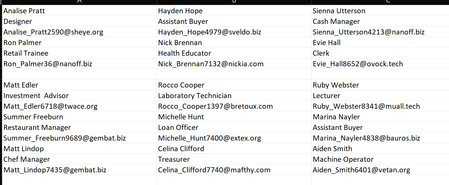

At that point I think it's still do-able but maybe not worth the trouble. I'd still ignore blanks with TOCOL, then I think it comes down to writing logic. I'd use the @ to identify complete records.
Text - Keep
Text - Keep
@ - Keep
Text - Drop
Text - Drop
Text - Keep
Text - Keep
@ - Keep

The attached shows alternative points within the calculation at which one may choose to apply the Bellman filter. I also tests for blank rows (as it would for repeat headers) and removes them with FILTER rather than using the setting within TOCOL.
[Note: the formula is still vulnerable to error if all 3 email addresses are missing from any given row]
- Patrick2788Jun 06, 2022Silver Contributor
As for your idea couldn't you take AlumniCol (i.e. after TOCOL and FILTER <>"" were applied) and then :
s, SEQUENCE(ROWS(AlumniCol)),
EmailRows, s*ISNUMBER(SEARCH("@",AlumniCol)),
validRows, (XMATCH(s,EmailRows,1)-s<3),
validAddress, FILTER(AlumniCol, validRows)I tried something similar with:
=LET(arr,TOCOL(alumni,1,1),MAP(arr,LAMBDA(x,IF(ISNUMBER(SEARCH("@",x)),XMATCH(x,arr),0))))Excel crunched for several seconds then returned a 0. No CPU/Memory spike, Excel just could not calculate it.
- mtarlerJun 06, 2022Silver ContributorOK so first i would suggest your step 3 could be simply FILTER <>0
NEXT i would suggest the excel team add a ReverseArray(). Ideally it could be flip vertical, horizontal or both.
Then, I would suggest after TOCOL and FILTER <>"", then ReverseArray(rows) so then you could use SCAN to easily pull out email, +1, +2 ...
validAddress, SCAN(0,rArray, LAMBDA(acc, val, IF( ISNUMBER(SEARCH("@",rArray)),3, MAX(acc,0)))
Then you could ReverseArray( FILTER(rArray, validAddress) )
As for your idea couldn't you take AlumniCol (i.e. after TOCOL and FILTER <>"" were applied) and then :
s, SEQUENCE(ROWS(AlumniCol)),
EmailRows, s*ISNUMBER(SEARCH("@",AlumniCol)),
validRows, (XMATCH(s,EmailRows,1)-s<3),
validAddress, FILTER(AlumniCol, validRows) - Patrick2788Jun 06, 2022Silver Contributor
I think your solution is excellent and the best for dealing with missing email addresses. I've put some thought into a solution that could deal with 3 missing email addresses in a row. Theoretically, I think it's possible (This is for a solution that would drop records without email addresses).
Here's how I step through it:
1. Convert the alumni range to a column with TOCOL and opt to ignore blanks
2. Obtain the row positions of elements in the array containing "@", return 0 if no "@" found
3. Sort the array, obtain unique values and drop the first element (the 0)
4. Subtract {0,1,2} from the array to obtain a matrix of row positions (name, job, email) of valid records. Convert matrix to a column.
5. Feed the row positions to INDEX and proceed with the rest of the formula (Split names, etc).
The biggest obstacle I've found to making this work is not being able to obtain the row positions of elements containing "@" from the array returned by =TOCOL(alumni,1,1). For example,
=BYROW(TOCOL(alumni,1,1),LAMBDA(row,ROW(row)))
Additionally, if I was able to obtain all the row positions to pull from TOCOL(alumni,1,1), there's no guarantee INDEX would be able to return the results.
