Forum Discussion

Patrick2788
May 29, 2022Silver Contributor
Formula challenge: re-shape and cleanup
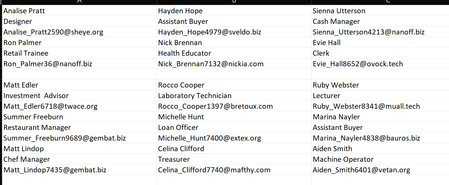
You're tasked with re-shaping and cleaning up the fictional Faber College alumni list to be used for a mail merge. Going from this: To this: To spice things up, the First and Last n...

Riny_van_Eekelen
May 31, 2022Platinum Contributor
Patrick2788 Although you explicitly mentioned NOT to use PQ, I did it anyway. I'm a lazy person and favor easy solutions over complicated ones. Your formula is impressively short and performed lightning fast on my laptop (also a 32GB machine).
Please find the PQ script that I used below. It worked as fast :))
let
    Source = Excel.CurrentWorkbook(){[Name="alumni"]}[Content],
    RemoveBlankRows = Table.SelectRows(Source, each not List.IsEmpty(List.RemoveMatchingItems(Record.FieldValues(_), {"", null}))),
    SplitTbl = Table.Split( RemoveBlankRows, 3 ),
    Convert = Table.FromList(SplitTbl, Splitter.SplitByNothing(), null, null, ExtraValues.Error),
    Transpose = Table.AddColumn(Convert, "Custom", each Table.Transpose ([Column1])),
    Remove = Table.SelectColumns(Transpose,{"Custom"}),
    Expand = Table.ExpandTableColumn(Remove, "Custom", {"Column1", "Column2", "Column3"}),
    Split = Table.SplitColumn(Expand, "Column1", Splitter.SplitTextByEachDelimiter({" "}, QuoteStyle.Csv, true), {"Column1.1", "Column1.2"}),
    Filter = Table.SelectRows(Split, each not Text.Contains([Column2], "Bellman"))
in
    Filter
With some knowledge of M (and I'm far from an expert) this isn't all that complicated and easy to follow. Thanks for the challenge and sorry for violating the rules of it.
 Patrick2788May 31, 2022Silver ContributorThanks for sharing! I've been meaning to dive into PQ more and this is something I can study. Thank you!