Forum Discussion

ra-v79
Jul 02, 2024Copper Contributor
Formula calculation displayed wrongly (IF results)
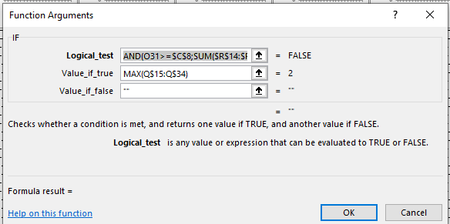
Dear community, I have a problem because first time I see something like this. Formula IF with two logic AND criteria calculates correctly, but result is showing in Cell as 0 (zero). In both ma...
- Jul 02, 2024
If you look at the status bar at the bottom, you'll see that the sheet has circular references, i.e. formulas that refer to the cell containing that formula.
This prevents Excel from recalculating formulas correctly.
The circular reference occurs in G5:G14. The formula in G5 is
=IF(AND(E5>=$F$2,SUM(G$4:$G5)=0),MAX($F$5:$F$14),"")
As you can see, the formula refers to G5 itself.
Change the formula to
=IF(AND(E5>=$F$2,SUM(G$4:$G4)=0),MAX($F$5:$F$14),"")
and then fill down to G14.
The circular reference warning disappears, and the formulas return the desired result:

ra-v79
Jul 02, 2024Copper Contributor
It worked. Thank you very much.
I was not expecting that this could be the problem because I get warning only for the circular reference in only one cell and problem was general, but you was right.
Thank you once more.
I was not expecting that this could be the problem because I get warning only for the circular reference in only one cell and problem was general, but you was right.
Thank you once more.

HansVogelaar
Jul 02, 2024MVP