Forum Discussion

Formatting Date from Excel
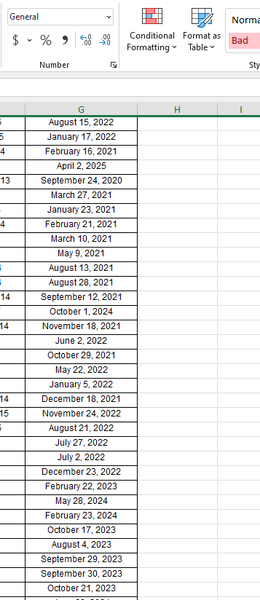


Michaelkoh89 Text to columns works for me. Did you set the column data format in step 3 to Date and MDY? For me, this turns the text into a real data value once I press Finish.

Riny_van_Eekelen Hi Riny,
Yes i did previously and it didnt get anything.
It was worth noting that i selected only the first date previously.
This time i selected the entire column and its interesting to see the results. It seems the first and the bottom September 30th did not convert.
- Riny_van_EekelenMar 31, 2022Platinum Contributor
Michaelkoh89 I suspect that you have leading or trailing spaces (or both) in the affected dates. Use TRIM to clean out the date column first. Copy/paste values and then do the TTC.
Edit:
Played around a bit. Even with "clean" texts TTC doesn't transform September dates after the 9th and it does not transform any texts starting with "June" at all. But When I use "Sep" and "Jun", all gets transformed to proper dates by TTC. Don't really know why.
- Michaelkoh89Apr 01, 2022Copper ContributorThats really strange. Do you think a manual workaround will be to use the Replace Function to replace the text September and June with Sep and Jun? A very manual workaround tho
- Riny_van_EekelenApr 01, 2022Platinum Contributor
Michaelkoh89 Try this in H4:
=LEFT(G4,3)&MID(G4,FIND(" ",G4),10)and copy it down as far as needed. Copy/Past values and then TTC.
Can't think of an easier way.