Forum Discussion

Nigel_Howarth
Feb 02, 2026Copper Contributor
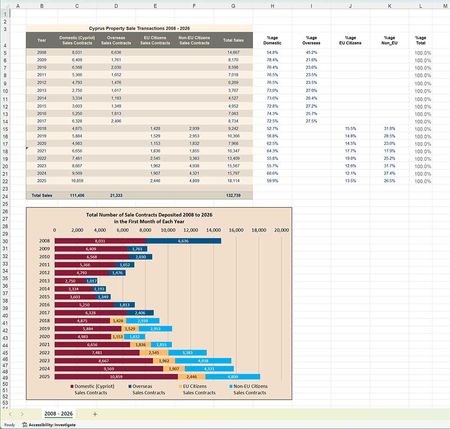
Format Data Labels - Value from Cells
I have a spreadsheet (below) that I wish to show in two different ways: The actual numbers in each of the cells Domestic, Overseas, EU, and Non-EU as shown. The percentage values as shown in t...
- Feb 02, 2026
Hi Nigel
No idea where this comes from but found it strange:
- Removed Data Label on all series
- Added them again
- Formatted each Data Label > Values From Cells > Selected the full range (rows 5-22):
I case this would matter… running 365 v2601- b19628.20150 / Windows
(bordered cell B18 where 2021 is stored as Text - something you'll probably want to fix…)

Lorenzo
Feb 03, 2026Silver Contributor
Suggestion to make your life easier & to display the correct Years above your data & chart title => Format your data as a Structured Table
Few benefits amongst others:
- Using structured references make formula more comprehensive
- Formulas, cells formatting, conditional formats, data validation… auto. apply to new rows you add to the Table
- If the Table Total Row is activated and contains formulas using structured ref., new rows are picked up auto.
Years on Data & Chart
- In attached sample B3 & B4 take the MIN & MAX of the [Year] column to dynamically adjust the Data & Chart titles (row 4 should be hidden)
- To ignore <blank/empty> Year(s) on the Chart: Right-click on the Vertical axis > Format Axis > Axis Options > Axis Type = Date axis
Hope this makes sense & helps
Lz.