Forum Discussion

jpinto521
Apr 03, 2023Copper Contributor
Format cells
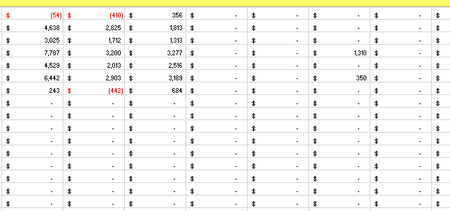
Hi All, I would like your help on the following. I have an excel workbook with several tab that point between them. One particular is capturing the data from other tab cells and is formatted as ...

NikolinoDE
Apr 04, 2023Platinum Contributor
To change the custom currency format to show blank when the cell is empty, you can use the following steps:
- Select the cells that you want to format.
- Right-click and select “Format Cells” from the context menu.
- In the “Format Cells” dialog box, select “Custom” from the list on the left.
- In the “Type” text box, enter #,##0.00;-#,##0.00;
- Click “OK” to close the dialog box.
This will format your cells with a custom currency format that shows blank when the cell is empty.
I hope that helps!
 jpinto521Apr 04, 2023Copper Contributor@NikolineDE,
Thank you.
It really works on a blank cell but i cannot apply it to a cell with values because it will change the format whenever there is a value on a cell.
Best regards,
jpinto521- SergeiBaklanApr 04, 2023Diamond Contributor
Just modify a bit format which NikolinoDE suggested. You have references on other cells and all you numbers have accounting format. Select entire range, Ctrl+1, Number -> Custom. It looks like
Now remove everything between second and third semicolons. The rest of custom format will be like
Apply this format, it hides zeroes in the grid.
- jpinto521Apr 04, 2023Copper Contributor
Thank you for your input as well.
Already solve my problem by using this format _($* #,##0_);[Red]_($* (#,##0);"".
Best Regards,
- NikolinoDEApr 04, 2023Platinum ContributorA file (without sensitive data), as well as information about the Excel version, operating system, storage medium, etc. would be advantageous to submit a quick solution here.
- jpinto521Apr 04, 2023Copper ContributorDear NikolinoDE,
I understand what you are saying. Nevertheless as this was just a formatting thing never cross my mind all that.
Anyway, using your own example I managed to solve my problem by custom formatting like this _($* #,##0_);[Red]_($* (#,##0);""
Thank you for your help on this.
Best Regards,
