Forum Discussion

drbradley
Feb 08, 2023Copper Contributor
Flash Fill Conditional Formatting?
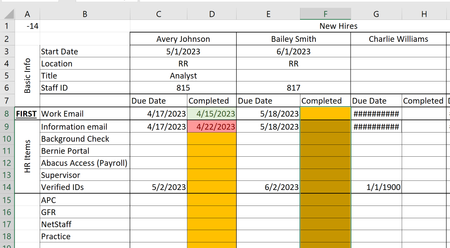
I'm working on a tracking sheet for when certain items are done for a new hire's profile. I currently have the due date column populated by a formula based upon the hire date. The c...

dscheikey
Feb 10, 2023Bronze Contributor
Please try this with the conditional formatting. You must not use the $ in the formula.
=AND(ISEVEN(COLUMN()),ISBLANK(D8))
=AND(ISEVEN(COLUMN()),C8<D8)
=AND(ISEVEN(COLUMN()),C8>D8)

Applies to:
=$D$8:$ZZ$25
 drbradleyFeb 14, 2023Copper Contributor
dscheikey Thank you! That is working so far! I did have an issue where if a date was present in the first column, but not the second the box would turn green instead of orange, but making that rule first and stopping rule running if true corrected the issue.
Could you explain to me what you did so I can apply it again in the future?