Forum Discussion

Find substring and bring category
- Jun 04, 2022
=INDEX( Mapping[Mapping],
  MATCH( TRUE, ISNUMBER( SEARCH(Mapping[Partial Text], [@[Name/Description]]) ), 0 ) )


Hello and thank you very much for your reply.
I tried =IFERROR(INDEX(mapping, MATCH(TRUE,ISNUMBER(SEARCH(mapping[Partial Text],transactions[#All])),0)),"") but the outcome is 0.
I imagine my steps would be :
1. find any text like lidl or kaufland from mapping in table 2 (store/transactions) and if find
2.bring index from mapping and based on that => category.
But I am afraid that search can't work on table to table.. just cell against cell.. what do you think?

I don't understand your formula. Could you attach a sample workbook (without sensitive data), or if that is not possible, make it available through OneDrive, Google Drive, Dropbox or similar? Thanks in advance.
- Frosty_AverageJun 04, 2022Copper Contributor
I see that I cant upload excels in here.
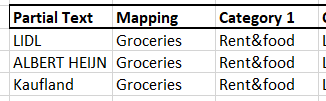
So I have table mapping :
and table transactions - where I want to bring the mapping with formulas, not manually. Buuut I do not have a common key, just partial text.
- SergeiBaklanJun 04, 2022Diamond Contributor
=INDEX( Mapping[Mapping], MATCH( TRUE, ISNUMBER( SEARCH(Mapping[Partial Text], [@[Name/Description]]) ), 0 ) )- Frosty_AverageJun 06, 2022Copper ContributorThank you very much!