Forum Discussion

Guadart
Mar 14, 2022Copper Contributor
Find out if contracts are consecutive for the last 6 months
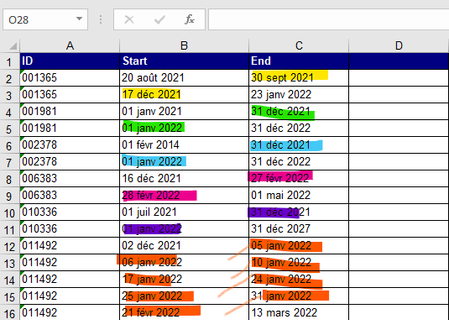
Hello, I've got several employees identified by ID for which I can have several contracts with a start date in one column and an end date in the following one and I need to find out for each employe...

PeterBartholomew1
Mar 14, 2022Silver Contributor
Hi, I only develop for Excel 365 / 2021 so the details of my solution may not be relevant.
= MAP(UNIQUE(ID), DaysOutOfContractλ)

where "DaysOutOfContractλ" is given by
= LAMBDA(distinctID,
     LET(
         startByID,       FILTER(Start, ID=distinctID),
         endByID,         FILTER(End, ID=distinctID),
         totalDuration,   1 + MAX(endByID)-MIN(startByID),
         totalContracted, SUM(1+endByID-startByID),
         outOfContract,   totalDuration-totalContracted,
         outOfContract
     )
  )
The key element that should be transferable to legacy Excel is to count the days under contract rather than those out of contract.
 GuadartMar 16, 2022Copper Contributor
PeterBartholomew1Thank you very much for your help ! I don't know VBA much so I need to check your solution with a coworker. I'll come back to say how it worked out. Thanks again.
- PeterBartholomew1Mar 16, 2022Silver ContributorFirst and foremost bear in mind that this solution is only usable if you have access to the latest versions of Excel 365. I can fully see how the misunderstanding arises, but the formula is a regular worksheet formula, albeit using functions that have only recently become available in Excel 365. No doubt some of the ideas would be transferable to VBA with a bit of refactoring.
What the LET function does is assign names to fragments of a nested formula which allows the formula to be written as if it were multiple statements. LAMBDA is similar, except that values are read from a parameter string, turning any formula into a function. Whether these changes to Excel fill you with horror and dread or excitement is a very individual matter.