Forum Discussion

Jagodragon
May 24, 2022Iron Contributor
Find if range has pictures [Solved with ongoing improvements?]
I have to find if each cell in a range has a picture in it. I have the script below running in VB and need to figure out how to make it work for a range of cells. Function HASpic(Cell...
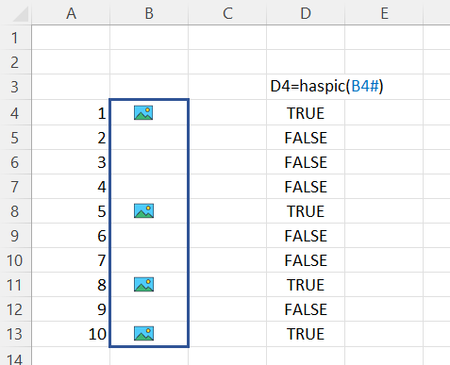
- May 27, 2022
Jagodragon good point. this should address that issue (i.e. search for pictures on the same sheet as the range your select)
Function HASpicR(x As Range) As Variant

'  Yields TRUE if the cell identified by row and col contains a picture,
'  otherwise FALSE
    Application.Volatile

   Dim p As Range
   Dim r, c         As Long
    Dim s() As Variant

   r = x.Rows.Count
   c = x.Columns.Count
   ReDim s(1 To r, 1 To c)

   For Each Pict In x.Parent.Pictures
      Set p = Pict.TopLeftCell
      If Not Intersect(p, x) Is Nothing Then
         s(p.Row - x.Row + 1, p.Column - x.Column + 1) = True
      End If
   Next Pict
   HASpicR = s

End Function

mtarler
Aug 08, 2023Silver Contributor
In theory I'm sure there is a way but not sure and wasn't even able to paste a word object into a spreadsheet. can you share an example? the other property you might try is .ListObjects
I would in the immediate pane just do a quick
Print activesheet.ListObjects.count
as a way to see if it might be a candidate for what you need. I still would have guessed Shapes. Maybe do the same 'count' test with Shapes and maybe the problem is what properties within the Shape Object are valid for that type.
I would in the immediate pane just do a quick
Print activesheet.ListObjects.count
as a way to see if it might be a candidate for what you need. I still would have guessed Shapes. Maybe do the same 'count' test with Shapes and maybe the problem is what properties within the Shape Object are valid for that type.

Maram2210
Aug 08, 2023Copper Contributor
sir I have tried the list Object. I think its reading, but it is not counting. I will post the code plus a photo.
Function HASpicR(x As Range) As Variant
' Yields TRUE if the cell identified by row and col contains a picture,
' otherwise FALSE
Application.Volatile
'Dim Pict As Object
Dim sourceCell, spillRange, p As Range
Dim r, c As Long
Dim s() As Variant
r = x.Rows.Count
c = x.Columns.Count
ReDim s(1 To r, 1 To c)
'Dim Pict As Object
For Each Pict In ActiveSheet.ListObjects
Set p = Pict.TopLeftCell
If Intersect(p, x).Count Then
s(p.Row - x.Row + 1, p.Column - x.Column + 1) = True
End If
Next Pict
HASpicR = s
End Function