Forum Discussion

YoloSpaceMuffin
Mar 19, 2023Copper Contributor
Filtering Data onto one Sheet
I want to filter the data from several different sheets onto one sheet if cell A2="Open". I know how to use the Filter function for just one sheet, however, I can't seem to figure out how to get it t...
 Mar 19, 2023
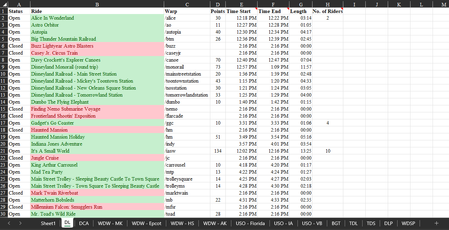
=VSTACK(HSTACK(INDEX(Sheet2!J1,SEQUENCE(ROWS(FILTER(Sheet2!B2:H17,Sheet2!A2:A17="OPEN")),1,1,0)),FILTER(Sheet2!B2:H17,Sheet2!A2:A17="OPEN")),HSTACK(INDEX(Sheet3!J1,SEQUENCE(ROWS(FILTER(Sheet3!B2:H17,Sheet3!A2:A17="OPEN")),1,1,0)),FILTER(Sheet3!B2:H17,Sheet3!A2:A17="OPEN")))For two sheets you can try this formula which can be expanded to many more sheets.
The table name is in cell J1 in each sheet. This cell is referenced in the formula in order to return the sheetname in column A of the summary sheet.
An alternative to the new formulas VSTACK, HSTACK, FILTER and SEQUENCE could be a transformation with Power Query.
OliverScheurich
Mar 19, 2023Gold Contributor
=VSTACK(HSTACK(INDEX(Sheet2!J1,SEQUENCE(ROWS(FILTER(Sheet2!B2:H17,Sheet2!A2:A17="OPEN")),1,1,0)),FILTER(Sheet2!B2:H17,Sheet2!A2:A17="OPEN")),HSTACK(INDEX(Sheet3!J1,SEQUENCE(ROWS(FILTER(Sheet3!B2:H17,Sheet3!A2:A17="OPEN")),1,1,0)),FILTER(Sheet3!B2:H17,Sheet3!A2:A17="OPEN")))For two sheets you can try this formula which can be expanded to many more sheets.
The table name is in cell J1 in each sheet. This cell is referenced in the formula in order to return the sheetname in column A of the summary sheet.
An alternative to the new formulas VSTACK, HSTACK, FILTER and SEQUENCE could be a transformation with Power Query.