Forum Discussion

Jessssssssss
Jan 17, 2024Tin Contributor
Filter total
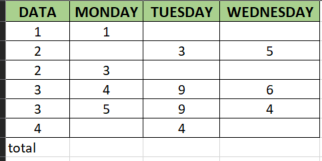
I have a table with data and days of the week with numbers in it. I want to filter the data and have the total summed for a single day instead of me having to highlight it and enter the data. (So if...

OliverScheurich
Jan 17, 2024Gold Contributor
=BYCOL(B2:G9,LAMBDA(c,SUMIFS(c,A2:A9,J2)))
With Office 365 or Excel for the web you can apply this formula. The filter criteria is in cell J2 and the formula dynamically updates the results.

Jessssssssss
Jan 18, 2024Tin Contributor
The only thing I can't figure out is that one cell is not adding up correctly to what is actually in the column of one of the filters. It has the total as 3210 when the total in the column is 4545. My formula is correct and it is adding correctly in every other cell is right but just this one will not properly sum up the filter
- OliverScheurichJan 18, 2024Gold Contributor
Can you attach a screenshot of your sheet without sensitive data which shows all the data just like my screenshot does?
- JessssssssssJan 18, 2024Tin ContributorI don't know what it's issue was but I found which row it wasn't adding up and just deleted a formula i had and manually put in the number i needed and it counted it. So problem fixed i guess lol thanks for your help!