Forum Discussion

Hogstad_Raadgivning
Feb 27, 2021Iron Contributor
Filter selection of top text
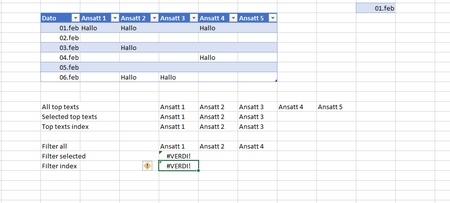
Hi. The goal her is to filter the top texts from a table, when two criteria is met. I manage to get it when I us the whole top text range, but if i onlye select some of the top texts =FILTER(...

SergeiBaklan
Feb 27, 2021Diamond Contributor
If for one day only and pre-defined column names, formula could be
=LET(
   selectedHeaders, $F$13#,
   selectedDate,    K2,
   headers,         Tabell1[[#Headers],[Ansatt 1]:[Ansatt 5]],
   data,            Tabell1[[Ansatt 1]:[Ansatt 5]],
   condition,       COUNTIF(selectedHeaders,headers)  *
                   (XLOOKUP(selectedDate,Tabell1[Dato],data)="Hallo" ),
   IFERROR(FILTER(headers, condition),"")
)
which returns

Hogstad_Raadgivning
Feb 27, 2021Iron Contributor
Hi, SergeiBaklan I Soleved. Had to use INDEX in the second filter as well
=FILTER(INDEX(Tabell1[#Headers];;2):INDEKS(Tabell1[#Headers];;4);FILTER(INDEX(Tabell1;;2):INDEX(Tabell1;;4);Tabell1[Dato]=K2)="hallo";"")
Thank you using your time and support Sergei.
Best Regards
- Geir
- SergeiBaklanFeb 27, 2021Diamond Contributor
Hogstad_Raadgivning , great to know you solved this, thank you for the update