Forum Discussion

Filter selection of top text
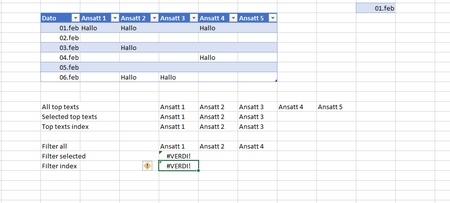

If for one day only and pre-defined column names, formula could be
=LET(
   selectedHeaders, $F$13#,
   selectedDate,    K2,
   headers,         Tabell1[[#Headers],[Ansatt 1]:[Ansatt 5]],
   data,            Tabell1[[Ansatt 1]:[Ansatt 5]],
   condition,       COUNTIF(selectedHeaders,headers)  *
                   (XLOOKUP(selectedDate,Tabell1[Dato],data)="Hallo" ),
   IFERROR(FILTER(headers, condition),"")
)
which returns

Thank you again SergeiBaklan The table could expand. I might just leave it to this.
=FILTER(Tabell1[#HEADERS];FILTRER(Tabell1;Tabell1[Dato]=K2)="hallo";"") since it work.
Still confused why this not work:
FILTER(INDEX(Tabell1[#HEADERS];;2):INDEX(Tabell1[#HEADERS];;4);FILTER(Tabell1;Tabell1[Dato]=K2)="hallo";"")
Since =INDEX(Tabell1[#Headers];;2):INDEX(Tabell1[#HEADERS];;4) returns the list I want, but not if the criteria is met with filter 😉
Why does this work =FILTER(Tabell1[#HEADERS];FILTRER(Tabell1;Tabell1[Dato]=K2)="hallo";"")
And this returns #VALUE: =FILTER(INDEX(Tabell1[#HEADERS];;2):INDEX(Tabell1[#HEADERS];;4);FILTER(Tabell1;Tabell1[Dato]=K2)="hallo";"")
- Geir