Forum Discussion

CS1999
Dec 27, 2022Copper Contributor
Filter rows from multiple column data
I currently have 5 columns with names I.E A, B, C, D, E and I want to be able to return the sum of the data (F1:AE23) for when those 5 names are duplicated. However, they may be in a different order ...
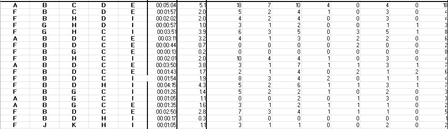
 Dec 27, 2022
=BYROW(A1:E23,LAMBDA(x,IF(TEXTJOIN("",,TRANSPOSE(SORTBY(TRANSPOSE(x),TRANSPOSE(x))))="ABCDE",SUM(OFFSET(x,0,5,1,26)),"")))
An alternative could be this formula which is easier to adapt if you want to check if e.g. A to Z occur in the first 26 columns in any order.
OliverScheurich
Dec 27, 2022Gold Contributor
=BYROW(A1:E23,LAMBDA(row,IF(AND(ISNUMBER(SEARCH("A",TEXTJOIN("",,row))),ISNUMBER(SEARCH("B",TEXTJOIN("",,row))),ISNUMBER(SEARCH("C",TEXTJOIN("",,row))),ISNUMBER(SEARCH("D",TEXTJOIN("",,row))),ISNUMBER(SEARCH("E",TEXTJOIN("",,row)))),SUM(OFFSET(row,0,5,1,26)),"")))
You can try this formula. However there should be an easier way to check if A, B, C, D and E occur in the first 5 columns in any order.

CS1999
Dec 28, 2022Copper Contributor
This worked! Thank you for the help!