Forum Discussion

anupambit1797
Mar 05, 2026Steel Contributor
Filter Function or TAKE-DROP Function
Dear Experts, I have a Data like this:- Column A -> Has the File Names, and Column B,C,D have their corresponding data, In Column F I have the unique File Names and from G/H/I...
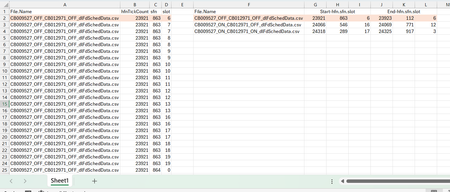
 Mar 05, 2026
Try below formula in cell F2:
=LET(
     colA, A2:.A100,
       tj, TEXTJOIN,
       ts, TEXTSPLIT,
      arr, ARRAYTOTEXT,
    HSTACK(UNIQUE(colA), --ts(tj(";",, BYROW(WRAPROWS(BYROW(TRANSPOSE(ts(tj(";",,
     BYCOL(B2:.D100, LAMBDA(b, arr(INDEX(b, DROP(DROP(GROUPBY(colA, SEQUENCE(ROWS(colA)),
    HSTACK(MIN, MAX),, 0), 1),, 1)))))), ", ", ";")), arr), 2), arr)), ", ", ";"))
)
Hope this helps.
IlirU

m_tarler
Mar 05, 2026Silver Contributor
alternatively:
=LET(in,A2:.D1000,
fnames,UNIQUE(TAKE(in,,1)),
fn_out,LAMBDA(fn,LET(a,FILTER(in,TAKE(in,,1)=fn),HSTACK(TAKE(a,1),DROP(TAKE(a,-1),,1)))),
DROP(REDUCE("",fnames,LAMBDA(p,q,VSTACK(p,fn_out(q)))),1))
If only I could get a better grip on Thunks so I could get away from the DROP(REDUCE()) work around for 2d arrays.
another alternative inspired by IlirU use of GROUPBY:
=LET(fnames,A2:.A999,data,B2:.D999,
     DROP(HSTACK(
                GROUPBY(fnames,data,HSTACK(MIN,MIN,MIN),,0),
            DROP(GROUPBY(fnames,data,HSTACK(MAX,MAX,MAX),,0),,1)),1))

anupambit1797
Mar 09, 2026Steel Contributor
m_tarler for the alternative which you proposed for the Groupby function could you please attach the spreadsheet using the formula.. I am getting something like this in my worksheet.