Forum Discussion

anupambit1797
Mar 05, 2026Steel Contributor
Filter Function or TAKE-DROP Function
Dear Experts, I have a Data like this:- Column A -> Has the File Names, and Column B,C,D have their corresponding data, In Column F I have the unique File Names and from G/H/I...
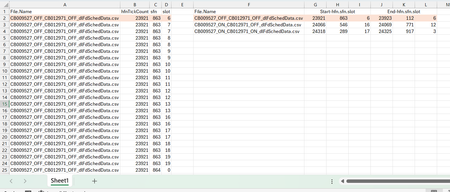
 Mar 05, 2026
Try below formula in cell F2:
=LET(
     colA, A2:.A100,
       tj, TEXTJOIN,
       ts, TEXTSPLIT,
      arr, ARRAYTOTEXT,
    HSTACK(UNIQUE(colA), --ts(tj(";",, BYROW(WRAPROWS(BYROW(TRANSPOSE(ts(tj(";",,
     BYCOL(B2:.D100, LAMBDA(b, arr(INDEX(b, DROP(DROP(GROUPBY(colA, SEQUENCE(ROWS(colA)),
    HSTACK(MIN, MAX),, 0), 1),, 1)))))), ", ", ";")), arr), 2), arr)), ", ", ";"))
)
Hope this helps.
IlirU

Patrick2788
Mar 06, 2026Silver Contributor
You can solve this on streak detection alone. Streak detection in this sense requires your data to be sorted and it looks like your sample is sorted.
=LET(
    start, FILTER(HSTACK(FileName, Details), Streakλ(FileName) = 1),
    end, FILTER(Details, Countdownλ(FileName) = 1),
    final, HSTACK(start, end),
    final
)
Streakλ and Countdownλ being two functions I use for situations like this.