Forum Discussion

Tanguy1684684214
Sep 16, 2026Copper Contributor
FILTER formula
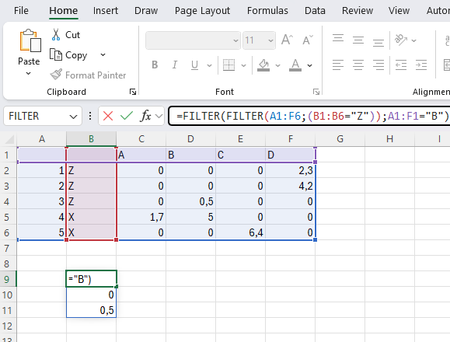
Hi, I don't know how to add a filter so the answer of the formula is no longer {0;0;0,5} but only {0,5} =FILTER(FILTER(A1:F6;(B1:B6="Z"));A1:F1="B") I will highly appreciate if someone got the ans...

djclements
Sep 18, 2026Silver Contributor
If you changed the order of the filtering so as to isolate the targeted column of data first, the second FILTER could then apply AND criteria by multiplying the single column of values by the second conditional argument (because zeros are interpreted as FALSE and all other numbers are interpreted as TRUE). For example, using LET and targeting the range of values only:
=LET(col; FILTER(C2:F6;C1:F1="B"); FILTER(col;col*(B2:B6="Z")))
If you still wanted to start by referencing the entire table (including headers and row labels), use (col<>0) in the second include argument to prevent the text values in the header row from causing a #VALUE! error:
=LET(col; FILTER(A1:F6;A1:F1="B"); FILTER(col;(col<>0)*(B1:B6="Z")))
Alternatively, REDUCE may be used to filter the data in 3 steps:
=REDUCE(A1:F6;SEQUENCE(3);LAMBDA(a;v;FILTER(a;CHOOSE(v;B1:B6="Z";A1:F1="B";a))))
I hope that helps point you in the right direction... ;)