Forum Discussion

davidmaddock54
Jul 20, 2022Brass Contributor
Filter dates previous Wednesday to Tuesday (Power Query or formula)
EDIT: Have updated this as I've worked out some issues but discovered more.... I am trying to use Power Query to combine some monthly data into weekly chunks provided by 5 different offices. ...

davidmaddock54
Aug 01, 2022Brass Contributor
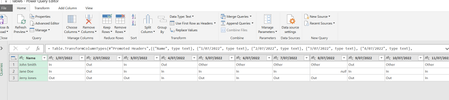
=table.TransformColumntypes(#"Promoted Headers", (("Name", type text), ("1/7/2022", type text)I'm not sure on syntax or formula with M-Code, but where it says "1/7/2022" it probably needs to be something that goes: this is a date (not a specific date) just promote it. unsure if I can do something like ("##/##/####", type date) or ("DD/MM/YYYY", type date) and get it to be dynamic, I feel like there'll need to be another step.

Riny_van_Eekelen
Aug 01, 2022Platinum Contributor
davidmaddock54 Indeed, when you change column types like that via the user interface, all column names get hard-coded. In your case, though, the Promote Header step already created text data types for all, so you don't need to do that again. Better to leave them as they are, unpivot and then set the correct data types on the three resulting columns (Name, Attribute and Value).