Forum Discussion

anupambit1797
Oct 16, 2024Steel Contributor
FILTER and SCAN function
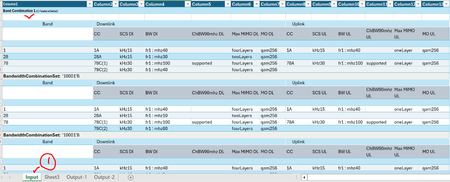
Dear Experts, Greetings! I have a data like below(Input worksheet), in Column1, there are 144 Band Combination(1~144) each with a specific Feature sets( ...

Patrick2788
Oct 16, 2024Silver Contributor
It's a bit of slog to get through this because the data arrangement is not ideal so I must make the data whole with arrays. Even then things may not be perfect.
Output1:
=LET(
    bwcs, "BandwidthCombinationSet:",
    band, SCAN("", Table1[Column1], LAMBDA(a, v, IF(LEFT(v, 16) = "Band Combination", v, a))),
    sets, IF(LEFT(Table1[Column1], 24) = bwcs, TEXTAFTER(Table1[Column1], bwcs), ""),
    rptfilter, sets <> "",
    result, GROUPBY(band, sets, ARRAYTOTEXT, , 0, , rptfilter),
    result
)
Output 2:
=LET(
    bwcs, "BandwidthCombinationSet:",
    filldown, LAMBDA(a, v, IF(v = "", a, v)),
    band, SCAN("", Table1[Column1], LAMBDA(a, v, IF(LEFT(v, 16) = "Band Combination", v, a))),
    sets, IF(LEFT(Table1[Column1], 24) = bwcs, TEXTAFTER(Table1[Column1], "'"), ""),
    sets_filled, SCAN("", sets, filldown),
    rptfilter, sets_filled <> "",
    result, PIVOTBY(band, sets_filled, sets_filled, COUNTA, , , , , , rptfilter),
    result
) anupambit1797Oct 16, 2024Steel Contributor
Thanks Patrick2788 ,if we use anyother function will it somehow help to reduce the formula, for the Output-1? for example, IFS B=3 then pick 1st 3 from Column "I", and so on
Br,
Anupam
- Patrick2788Oct 16, 2024Silver ContributorWhat is the desired return in J?
- anupambit1797Oct 16, 2024Steel Contributor
HiPatrick2788 , it should be the same as in Col-M in your previous results for Output-1
Also, I noticed that , there seems some issue in the formula as if there's 3 Feature set , then in Col-M it must have 3 entries , but seems there are 4..
Br,
Anupam